Sunday, November 10, 2013

Web service Jbossws cxf: Enhance the Performance to get the service and the port getSertvice and getPort resolved

I was testing a Web Service developed respecting the JAX-WS specification and deployed on Jboss 6. The stack used by the Jboss is the JBossws-cxf 3.4.

Every time I call the getPort, it takes a good laps of time :

myService = new mydevelopedWSService();
System.out.println("take a port takes time " +System.currentTimeMillis());
mydevelopedWS myPort = myService.getmydevelopedWSPort();

In fact what I have find in the internet and in different forum, is that initializing the service involves reading and parsing the wsdl, and getting the port involves the creation of a dynamic port. Oracle specifies that by getting a dynamic client proxy, the application retrieves and interprets the WSDL and dynamically constructs calls. A dynamic proxy client enables a Web service client to invoke a web servicto invoke a Web service based on a service endpoint interface (SEI) dynamically at run-time (without using clientgen, wsconsume in jboss or wsimport in metro). This option does not rely upon a specific service implementation, providing greater flexibility, but also a greater performance hit.

In JBoss, I was trying to reduce this call time, and have seen that by chanding a properti in a file in the deployers, it can reduce considerably the time.

Here is the change to do. Open the file "stack-agnostic-jboss-beans.xml" located in "C:\jboss-6.1.0.Final\server\myconf\deployers\jbossws.deployer\META-INF". This property

<property name="webServiceHost">${jboss.bind.address}</property>
<property name="modifySOAPAddress">false</property>

 The default value is set to true, which means that JBoss is re-writing the soap-address in the WSDL every time we are retrieving it even if the specified address is valid. I have changed this property to false in order to disable this re-write and the application performance was better.

In JBoss eap 6.1, this parameter can be changed in the Standalone.xml located in JBoss-eap-6.1HOME\standalone\configuration.


Sunday, November 3, 2013

Invalid endpoint address in port portName in service ServiceLocator: REPLACE_WITH_ACTUAL_URL


When developing a web service, we often generate WSDL automatically using Wsimport in metro or Wsprovide in Jboss.
When I was trying creating a Wb Service client, I have had this error:
Invalid endpoint address in port portName in service ServiceLocator: REPLACE_WITH_ACTUAL_URL

In fact, in the generated WSDL, there was

<soap:address location="REPLACE_WITH_ACTUAL_URL"></soap:address>

where the Address should be replaced by the service Address

<soap:address location="http://localhost:8080/service/myService.ws"></soap:address>

Saturday, November 2, 2013

How to Get a Heap Dump : Analyze an OutOfMemoryError Java heap space - Part1 -

A Heap Dump is a snapshot of the memory of a Java process at a certain point of time. This snapshot contains information about the Java Objects and Classes in the heap. 

Step 1: Configure the JVM to generate a Heap Dump on an OutofMemory

In order to generate a heap dump when an "java.lang.OutOfMemoryError: Java heap space" exception occurs, the first thing to do is to add -XX:+HeapDumpOnOutOfMemoryError in the VM parameters. I am using Jboss6 server, so belong are the modifications. If you want to have a heap dmp on "CTRL BREAK", you can also add this parameter -XX:+HeapDumpOnCtrlBreak.


When an OutofMemory happens, this will generate a java_pid*.hprof file in the "C:\jboss-6.1.0.Final\bin" directory. This path can be changed in the VM parameters : -XX:HeapDumpPath= path_of_the_dump_file.

Step 2: Force the generation of a Heap Dump 

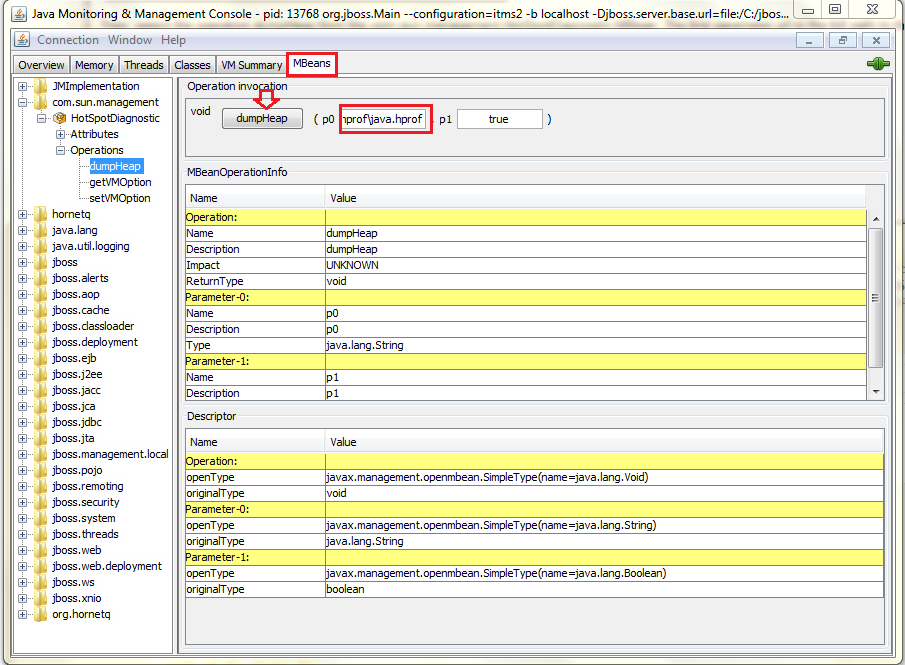
1- Using JConsole

Another way to generate a heap Dump is by using the JCONSOLE which can be found in the "C:\Java\jdk1.6.0_20\bin" directory.

 Select the dumpHeap operation from the com.sun.management.HotSpotDiagnostic MBean. As parameter p0 you should specify the full path to the heap dump file (exp "C:\hprof_Directory"). The file name should ends with .hprof. Clic to the dumpHeap button, a file will be generated in the choosen directory.


2- Using Memory Analyzer from Eclipse

Another way to have a Heap Dump is to use the Memory Analizer Plugin which can be added to eclipse. Please refer to this link. 
Open the Memory Analysis.


Then acquire a heap dump:


Step 2: Heap Dump Analysis


Once you have created your heap dump, you can analyze it using MAT (Memory Analzer). So Open the heap dump and navigate in the different options.


Tuesday, October 29, 2013

Change Soap Request Response Header : java.lang.UnsupportedOperationException / javax.xml.ws.soap.SOAPFaultException: Fault string, and possibly fault code, not set


While testing a web service, I have encountred this error:

javax.xml.ws.soap.SOAPFaultException: Fault string, and possibly fault code, not set
at org.apache.cxf.jaxws.JaxWsClientProxy.invoke(JaxWsClientProxy.java:146)
...
Caused by: java.lang.UnsupportedOperationException
at java.util.AbstractMap.put(AbstractMap.java:186)
at org.apache.cxf.binding.soap.interceptor.SoapPreProtocolOutInterceptor.setSoapAction(SoapPreProtocolOutInterceptor.java:120)
at org.apache.cxf.binding.soap.interceptor.SoapPreProtocolOutInterceptor.handleMessage(SoapPreProtocolOutInterceptor.java:62)
at org.apache.cxf.binding.soap.interceptor.SoapPreProtocolOutInterceptor.handleMessage(SoapPreProtocolOutInterceptor.java:46)
at org.apache.cxf.phase.PhaseInterceptorChain.doIntercept(PhaseInterceptorChain.java:255)
at org.apache.cxf.endpoint.ClientImpl.invoke(ClientImpl.java:516)
at org.apache.cxf.endpoint.ClientImpl.invoke(ClientImpl.java:313)
at org.apache.cxf.endpoint.ClientImpl.invoke(ClientImpl.java:265)
at org.apache.cxf.frontend.ClientProxy.invokeSync(ClientProxy.java:73)
at org.apache.cxf.jaxws.JaxWsClientProxy.invoke(JaxWsClientProxy.java:124)


In fact, I have a client web service code trying to add a SOAP header to a request before calling the Web service.
The problem comes from this part:

BindingProvider bp = (BindingProvider) webServicePort;
bp.getRequestContext().put(MessageContext.HTTP_REQUEST_HEADERS,
Collections.singletonMap("Cookie", Collections
.singletonList(yourCookieString));

In fact Collections.singletonMap() is used to get an immutable map which cause a UnsupportedOperationException in the getRequestContext().put() method.
Thanks to Ridwan Nizam, we have changed the code :

BindingProvider bp= (BindingProvider) webServicePort;
Map<String, List<String>> singletonMap = new HashMap<String, List<String>>() singletonMap.put("Cookie", Collections.singletonList(yourCookieString));
bp.getRequestContext().put(MessageContext.HTTP_REQUEST_HEADERS,
singletonMap);

Great, the Exception is then RESOLVED ;)


Biblio:
http://blog.sanaulla.info/2012/11/28/unsupportedoperation-exception-while-using-map-in-java/

Monday, October 28, 2013

Cannot be cast to com.sun.xml.ws.developer.WSBindingProvider: Jboss5 with Metro to Jboss6 /JBoss EAP 6 with JbossWS-Stack

I was working on a migration form Jboss5 using Metro to a Jboss6.1 using the JbossWS-CXF3.4 stack which comes with Jboss.
When I run my application, I have this error :
Cannot be cast to com.sun.xml.ws.developer.WSBindingProvider

In fact, I have a code, where the Webservice Port was cast to com.sun.xml.internal.ws.developer.WSBindingProvider

 WSBindingProvider bp = (WSBindingProvider) webServicePort;

This cast works before with Metro as we use the Sun reference implementation of JAX-WS. As Jboss6.1 comes with CXF stack for web Service, this cast should be adjusted by using javax.xml.ws.BindingProvider.
So the code becomes :

BindingProvider bp = (BindingProvider) webServicePort;

Hope it helps you :)

Sunday, October 6, 2013

Java compiler level does not match the version of the installed java project facet error in eclipse

I have this Error in eclipse for my prject :

java compiler level does not match the version of the installed java project facet

I was using JDK 1.6.0 as a JRE System Library. The solution was to right clic on the project -> Properties and to fix the Project Facet according to the Java version you are using,  here it is 1.6 instead of 1.5 which I have found.


The error is then fixed :) .

Articles les plus consultés