Showing posts with label Spring. Show all posts

Tuesday, October 14, 2014

Spring Resolve Error : Element 'beans' cannot have character [children], because the type's content type is element-only.

I was working with Spring framework and get this error in the applicationcontext.xml (spring-integration-context.xml with Spring-Integration):

 Element 'beans' cannot have character [children], because the type's content type is element-only.

So something is wrong with my configuration. In fact, after reading carefully again the xml, I have found that I have added a wrong comment. So if you get this error, just check again your xml tags.

I get also this error :

cvc-complex-type.2.4.c: The matching wildcard is strict, but no declaration can be found for element 'int-mqtt:outbound-channel-adapter'.
- schema_reference.4: Failed to read schema document 'http://www.springframework.org/schema/integration/mqtt/spring-integration-mqtt.xsd', because 1) could not find the document; 2) the document could not be read; 3) the root element of the 
document is not .

In fact the problem was that the given xsd address don't exists. By checking, I have found the right one:

http://www.springframework.org/schema/integration/mqtt/spring-integration-mqtt-4.0.xsd

Normally if you use maven you will not get this error.


Tuesday, May 27, 2014

Create ConcurrentHashmap with a Bean as Key (in Spring Project)

Step 1: Create the Bean Key:

In our case, the Key is a Bean. Normally it should be an immutable, but as I am working with Spring and it is difficult to use immutable beans, I have created a normal bean.


Step 2: Override Equal and HashCode:


Using eclipse, you can generate source code for the hashcode and equal. So you need just to right-clic -> Source -> Generate Hash


So the Bean which will be the Key (here it is called User.java) is :

package main.org.qmic.nr.beans;

import org.springframework.context.annotation.Scope;
import org.springframework.stereotype.Component;

@Component
@Scope("singleton")
public class User {

    String enterprise;
    String name;
    
    
    public User() {
        super();
    }

    @Override
    public int hashCode() {
        final int prime = 31;
        int result = 1;
        result = prime * result
                + ((enterprise == null) ? 0 : enterprise.hashCode());
        result = prime * result + ((name == null) ? 0 : name.hashCode());
        return result;
    }


    @Override
    public boolean equals(Object obj) {
        if (this == obj)
            return true;
        if (obj == null)
            return false;
        if (getClass() != obj.getClass())
            return false;
        User other = (User) obj;
        if (enterprise == null) {
            if (other.enterprise != null)
                return false;
        } else if (!enterprise.equals(other.enterprise))
            return false;
        if (name == null) {
            if (other.name != null)
                return false;
        } else if (!name.equals(other.name))
            return false;
        return true;
    }
    
    public User(String enterprise, String name) {
        super();
        this.enterprise = enterprise;
        this.name = name;
    }

    public String getEnterprise() {
        return enterprise;
    }


    public void setEnterprise(String enterprise) {
        this.enterprise = enterprise;
    }

    public String getName() {
        return name;
    }
    
    public void setName(String name) {
        this.name = name;
    }   
}


Step3: Declare the ConcurrentHashMap


private final Map<Device, LatestInfo> latestInfoCache = new ConcurrentHashMap<Device, LatestInfo>();


That's all :)

Thursday, May 15, 2014

Spring Tutorial : Develop your Software based on Spring 4, JPA 2.0 and JBoss EAP 6.2 / JBoss AS 7.3

I will speak today about how can we integrate Spring 4 with JBoss AS 7 (JBoss EAP 6). 

Step 1 : Persistence.xml

The persistence.xml creation will depend on weather the Entity Manager will be managed by the container (JBoss so JPA 2.0) or by Spring (Where we will use JPA 2.1).

JBoss manage the EntityManager: Use of JPA 2.0 with JTA transaction Type

In this case, the Transaction Type must be JTA. JBoss EAP 6.2 (based on JBoss 7.3) comes with JPA2.0 :


 1
 2
 3
 4
 5
 6
 7
 8
 9
10
11
12
13
14
<?xml version="1.0" encoding="UTF-8"?>
<persistence version="2.0" 
xmlns="http://java.sun.com/xml/ns/persistence"
xmlns:xsi="http://www.w3.org/2001/XMLSchema-instance" 
xsi:schemaLocation="http://java.sun.com/xml/ns/persistence http://java.sun.com/xml/ns/persistence/persistence_2_0.xsd">
    <persistence-unit name="module_enterprise" transaction-type="JTA">
  <jta-data-source>java:/myDS</jta-data-source>   
   <properties> 
   <property name="hibernate.dialect" value="org.hibernate.dialect.PostgreSQLDialect"/>
   <property name="hibernate.show_sql" value="true" />
   <property name="hibernate.hbm2ddl.auto" value="validate"/>
  </properties>
 </persistence-unit>  
</persistence>

- Spring manage the EntityManager: Use of JPA2.0 with RESOURCE_LACAL transaction type


As we need to let Spring manage the persisitence unit and e want to use RESOURCE_LOCAL transaction type, we need to exclude JPA and Hibernate coming from JBoss.
So the steps are:
- Create a jpa-persistence.xml. In the case where you don't want that JBoss inject its own libraries, it is better to change the name of the persistence.xml ( JBoss will load JPA implicitely if it detects perssistence.xml file).

- Use RESOURCE_LOCAL and not JTA, if you don't really need to access multiple data sources

- Use "org.hibernate.jpa.HibernatePersistenceProvider" as a provider

- Add a property in the persistence.xml
<property name="jboss.as.jpa.managed" value="false"/>

In fact, according to JBoss Reference, jboss.as.jpa.managed can be set to false to disable container managed JPA access to the persistence unit.  The default is true, which enables container managed JPA access to the persistence unit.  This is typically set to false for Seam 2.x + Spring applications. 


 1
 2
 3
 4
 5
 6
 7
 8
 9
10
11
12
13
14
15
16
17
18
19
<?xml version="1.0" encoding="UTF-8"?>
<persistence version="2.0" xmlns="http://java.sun.com/xml/ns/persistence" xmlns:xsi="http://www.w3.org/2001/XMLSchema-instance" 
xsi:schemaLocation="http://java.sun.com/xml/ns/persistence http://java.sun.com/xml/ns/persistence/persistence_2_0.xsd">
<!-- <persistence version="2.1"
    xmlns="http://xmlns.jcp.org/xml/ns/persistence"
    xmlns:xsi="http://www.w3.org/2001/XMLSchema-instance"
    xsi:schemaLocation="http://xmlns.jcp.org/xml/ns/persistence 
    http://xmlns.jcp.org/xml/ns/persistence/persistence_2_1.xsd"> -->
    <persistence-unit name="module_enterprise" transaction-type="RESOURCE_LOCAL">
  <provider>org.hibernate.jpa.HibernatePersistenceProvider</provider>
  <non-jta-data-source>java:/myDataSource</non-jta-data-source>   
   <properties> 
   <property name="jboss.as.jpa.managed" value="false" />
   <property name="hibernate.dialect" value="org.hibernate.dialect.PostgreSQLDialect"/>
   <property name="hibernate.show_sql" value="true" />
   <property name="hibernate.hbm2ddl.auto" value="validate"/>
  </properties>
 </persistence-unit>  
</persistence>

Step 2 : Spring Configuration

Same think here: 

JBoss manage the EntityManager or EntityManagerFactory and Spring have just the jndi nameTransaction Type here must be JTA. The ApplicationContext looks like this:


 1
 2
 3
 4
 5
 6
 7
 8
 9
10
11
12
13
14
15
16
17
18
19
20
<?xml version="1.0" encoding="UTF-8"?>
<beans xmlns="http://www.springframework.org/schema/beans"
 xmlns:xsi="http://www.w3.org/2001/XMLSchema-instance"
 xmlns:context="http://www.springframework.org/schema/context"
 xmlns:jee="http://www.springframework.org/schema/jee"
 xmlns:tx="http://www.springframework.org/schema/tx"
 xsi:schemaLocation="http://www.springframework.org/schema/beans http://www.springframework.org/schema/beans/spring-beans.xsd
 http://www.springframework.org/schema/context http://www.springframework.org/schema/context/spring-context.xsd
 http://www.springframework.org/schema/jee http://www.springframework.org/schema/jee/spring-jee.xsd
 http://www.springframework.org/schema/tx http://www.springframework.org/schema/tx/spring-tx.xsd">

 <!-- post-processors for all standard config annotations -->
 <tx:annotation-driven />
 <context:annotation-config />
 <context:component-scan base-package="org.test"/>
 
 <jee:jndi-lookup id="myDataSource" jndi-name="java:/myDS"/>
 <jee:jndi-lookup id="entityManagerFactory_module" jndi-name="java:comp/env/test/myfact"  expected-type="javax.persistence.EntityManagerFactory"/>   
 <tx:jta-transaction-manager/>
</beans> 


In this case, the application uses a server-deployed persistence unit. Thus the javax.persistence classes and the persistence provider (Hibernate) are contained in modules in JBoss ( in JBOSS_HOME\modules\system\layers\base\javax\persistence\api\main) and added automatically by the application while the deployment (When detecting the persistence.xml or persistence-unit, JBoss inject implicitly Hibernate).
So using the server-deployed persistence unit, you need also to declare the JNDI persistence context in the Web.xml:
NB: The persistence-unit-name specified in web.xml should be the same  in perssitence.xml file  ( <persistence-unit name="module_enterprise" )


 1
 2
 3
 4
 5
 6
 7
 8
 9
10
11
12
<?xml version="1.0" encoding="UTF-8"?>
<web-app version="3.0" xmlns="http://java.sun.com/xml/ns/javaee" xmlns:xsi="http://www.w3.org/2001/XMLSchema-instance" xsi:schemaLocation="http://java.sun.com/xml/ns/javaee
http://java.sun.com/xml/ns/javaee/web-app_3_0.xsd" metadata-complete="true">

 <listener>
  <listener-class>org.springframework.web.context.ContextLoaderListener</listener-class>
 </listener>
 <persistence-unit-ref>
  <persistence-unit-ref-name>test/myfact</persistence-unit-ref-name>
  <persistence-unit-name>module_enterprise</persistence-unit-name>
 </persistence-unit-ref>
</web-app>

Note here that the name that we have declared in the application context is java:comp/env/test/myfactand in the web.xml, we need to put just test/myfact

If Spring cannot find the Default JBoss transaction Manager, you can guide it like explained in this post.

- Spring manage the EntityManager.

Using JPA2.0, we can enable the JPA in JBoss and use the first possibility. But as we have disabled JPA in JBoss, Spring is now responsible of creating th Transaction and the EntityManagerFactory.
My applicationContext looks like this:


 1
 2
 3
 4
 5
 6
 7
 8
 9
10
11
12
13
14
15
16
17
18
19
20
21
22
23
24
25
26
27
28
29
30
31
32
33
34
35
<?xml version="1.0" encoding="UTF-8"?>
<beans xmlns="http://www.springframework.org/schema/beans"
 xmlns:xsi="http://www.w3.org/2001/XMLSchema-instance"
 xmlns:context="http://www.springframework.org/schema/context"
 xmlns:jee="http://www.springframework.org/schema/jee"
 xmlns:tx="http://www.springframework.org/schema/tx"
 xsi:schemaLocation="http://www.springframework.org/schema/beans http://www.springframework.org/schema/beans/spring-beans.xsd
 http://www.springframework.org/schema/context http://www.springframework.org/schema/context/spring-context.xsd
 http://www.springframework.org/schema/jee http://www.springframework.org/schema/jee/spring-jee.xsd
 http://www.springframework.org/schema/tx http://www.springframework.org/schema/tx/spring-tx.xsd">

 <!-- post-processors for all standard config annotations -->
 <tx:annotation-driven />
 <context:annotation-config />
 <context:component-scan base-package="org.test"/>
 
 <jee:jndi-lookup id="myDataSource" jndi-name="java:/myDataSource"/>
 
 <bean id="emfEnterprise" class="org.springframework.orm.jpa.LocalContainerEntityManagerFactoryBean">
  <property name="dataSource" ref="myDataSource" />
  <property name="jpaVendorAdapter" ref="jpaAdapter" />
  <property name="persistenceUnitName" value="module_enterprise"/>
   <property name="persistenceXmlLocation" value="classpath*:META-INF/jpa-persistence.xml"/>  
 </bean> 
 
 <bean id="mddEnterpriseTxManager" class="org.springframework.orm.jpa.JpaTransactionManager">
  <property name="entityManagerFactory" ref="emfEnterprise" />
 </bean> 

  <bean id="jpaAdapter" class="org.springframework.orm.jpa.vendor.HibernateJpaVendorAdapter">
        <property name="showSql" value="true" />
        <property name="generateDdl" value="true" />
        <property name="databasePlatform" value="org.hibernate.dialect.PostgreSQLDialect" />
    </bean>
</beans>


That's all, so now you are able to integrate JBoss with Spring either by allowing JBoss manage your persistence unit or by letting only Spring doing this and EXCLUDE JBOSS JPA and Hibernate modules.


Tuesday, May 6, 2014

Resolved : Logging in Jboss EAP 6 (JBoss AS7), Spring using Log4j

I was for a good time wondering why my Log4j is logging only the messages coming from my classes but not frameworks like  Spring, JDBC Template, CSveed. Every think was well configured, no error messages but I see framework messages only in the server.log.


So finally, I found the right steps to do.

Step 1:


Exclude Logging from JBoss. This previous article explains how to do.
So here is my jboss-deployment-structure.xml :


 1
 2
 3
 4
 5
 6
 7
 8
 9
10
11
<jboss-deployment-structure>
 <deployment>
 <!-- Add this line in the server lauch parameter : -Dorg.jboss.as.logging.per-deployment=false -->
  <exclusions>
   <module name="org.apache.log4j"/>
   <module name="org.apache.commons.logging"/>
              <module name="org.slf4j" />
             <module name="org.slf4j.impl" />
  </exclusions>   
 </deployment>
</jboss-deployment-structure>

Step 2:


Put you log4j.xml or log4j.properties in your classpath. In a Maven project, it should be under "\src\main\resources". Othrwhise, you can fix the classpath in the web.xml


1
2
3
4
5
6
7
8
<listener>
 <listener-class>org.springframework.web.util.Log4jConfigListener</listener-class>
</listener>

<context-param>
 <param-name>log4jConfigLocation</param-name>
 <param-value>classpath:/main/resources/META-INF/log4j.xml</param-value>
</context-param>


Step 3:

So Now, we need to add the required jar, AND Exclude some Jars. In the pom.xml, we need to exclude commons-logging from Spring-context jar and we need to add slf4j-api, slf4j-log4j12, jcl-over-slf4j, log4j.


 1
 2
 3
 4
 5
 6
 7
 8
 9
10
11
12
13
14
15
16
17
18
19
20
21
22
23
24
25
26
27
28
29
30
31
32
33
34
<dependency>
 <groupId>org.springframework</groupId>
 <artifactId>spring-context</artifactId>
 <version>${spring.version}</version>
 <exclusions>
  <exclusion>
   <artifactId>commons-logging</artifactId>
   <groupId>commons-logging</groupId>
  </exclusion>
 </exclusions>
</dependency>
<dependency>
 <groupId>org.slf4j</groupId>
 <artifactId>slf4j-api</artifactId>
 <version>${slf4j-log4j12.version}</version>
 <scope>runtime</scope>
</dependency>
<dependency>
 <groupId>org.slf4j</groupId>
 <artifactId>slf4j-log4j12</artifactId>
 <version>${slf4j-log4j12.version}</version>
 <scope>runtime</scope>
</dependency>
<dependency>
 <groupId>org.slf4j</groupId>
 <artifactId>jcl-over-slf4j</artifactId>
 <version>${slf4j-log4j12.version}</version>
 <scope>runtime</scope>
</dependency>
<dependency>
 <groupId>log4j</groupId>
 <artifactId>log4j</artifactId>
 <version>${log4j.version}</version>
</dependency>

So this step was the latest and Important step that I have discovered and which blocked my logging before.

Wednesday, April 30, 2014

Spring-Integration Resolve Error: one of inputChannelName or inputChannel is required

I have encountered one time this kind of error while deploying my  Web application based on Spring-Integration. The error were:

Caused by: java.lang.IllegalStateException: one of inputChannelName or inputChannel is required
at org.springframework.util.Assert.state(Assert.java:385) [spring-core-4.0.3.RELEASE.jar:4.0.3.RELEASE]
at org.springframework.integration.config.ConsumerEndpointFactoryBean.initializeEndpoint(ConsumerEndpointFactoryBean.java:225) [spring-integration-core-4.0.0.M4.jar:]


In fact, I was managing errorChannel and my Service Activator responsible of handling the error messages was declared like this :


1
2
3
4
5
6
7
8
<int:channel id="errorChannel"/>

<int:service-activator id="errorHandler"
 input-channel="errorChannel" 
 method="handleError" 
 output-channel="nullChannel" 
 ref="errorHandler"/>
  

Although my input channel is declared, I get the error.
The problem was that I put the same name for the id and ref in the service-activator. So the error is caused by that and not because the input channel is not declared. So I have rectified my code :


1
2
3
4
5
6
7
8
<int:channel id="errorChannel"/>

<int:service-activator id="errorService"
   input-channel="errorChannel" 
   method="handleError" 
   output-channel="nullChannel" 
   ref="errorHandler"/>
  

Monday, April 28, 2014

Resolved : Spring Initialize a bean which depends on another bean: Use JdbcTemplate when initializing a bean.

I was working on a web project using spring. I needed in the project to initialize a cache by doing a call to the database. So in order to do so, I was putting the database call in the default class constructor.
So in my Configuration class I do

@Bean("usersCache")
@DependsOn("myJdbcTemplate")
public UsersCache userCache{
    return new UsersCache(); 
}

And in the UserCache constructor I do :

@ManagedResource
public class UsersCache {
@Autowired
JdbcTemplate jdbcTemplate;

@PostConstruct
public UsersCache(){

@SuppressWarnings({ "unchecked", "rawtypes" })
List<LatestRecordPerUser> latestRecordByDevice = jdbcTemplate.query(populateCache, new BeanPropertyRowMapper(LatestRecordPerUser.class));
for(LatestRecordPerUser record:latestRecordByDevice ){
// And Here I insert into my cache
}
}


But even using this code I get a NullPointerException as the JdbcTemplate bean is not injected:

Caused by: org.springframework.beans.BeanInstantiationException: Could not instantiate bean class [main.java.org.beans.UsersCache ]: Constructor threw exception; nested exception is java.lang.NullPointerException

I have later understand that as the UsersCache is not yet initialized, nothing will be injected to it. So only after initialization, spring will inject the jdbcTemplate and thus we can execute the request.

So the fix the problem, there is no need to use @dependsOn . We need just to populate the cache after the bean (or repository) initialisation, So this can be done thanks to @PostConstruct. So the code is now :

@Repository
@Scope("singleton")
public class UsersCache {
@Autowired
JdbcTemplate jdbcTemplate;

private final Map userCache = new ConcurrentHashMap();

@PostConstruct
public void init(){

@SuppressWarnings({ "unchecked", "rawtypes" })
List<LatestRecordPerUser> latestRecordByDevice = jdbcTemplate.query(populateCache, new BeanPropertyRowMapper(LatestRecordPerUser.class));

for(LatestRecordPerUser record:latestRecordByDevice ){
// And Here I insert into my cache
}
}

Thant's it :D

Thursday, April 24, 2014

Resolved : log4j:WARN No appenders could be found for logger (org.springframework.web.context.support.SpringBeanAutowiringSupport

I was fixing my Log4j.xml on my web project developed with Spring and running on JBoss.


Deploying my application, It catches my eyes an error message although my application was deployed.
it was this error:

4:27:14,323 ERROR [stderr] (MSC service thread 1-2) log4j:WARN No appenders could be found for logger (org.springframework.web.context.support.SpringBeanAutowiringSupport).
14:27:14,323 ERROR [stderr] (MSC service thread 1-2) log4j:WARN Please initialize the log4j system properly.

It was really strange as I declare a logger for org.springframework.
But it seems that the porblem is coming from SpringBeanAutowiringSupport. Although I have declared also a logger fro this method. It didn't work and I get the same error.

What is special for this class is that I am using it to extend my web service class an that it will be initialized and managed by Spring.
So my code was like this :

@WebService(serviceName = "UserService")
public class UserService extends SpringBeanAutowiringSupport {
// Here the service implementation
...
}

It was a normal code. And it works fine. But my log4j seems not very happy.
After some search, I have seen by chance in one blog how to use the SpringBeanAutowiringSupport differently.
Based on that, I have modified my code and now it looks like this :

@WebService(serviceName = "UserService")
public class UserService extends SpringBeanAutowiringSupport {

   @PostConstruct
    public void init() {
              SpringBeanAutowiringSupport.processInjectionBasedOnCurrentContext(this);
    }

...
}

Surprise, now every think is working nice and I have no more error messages while deploying.  This is nice :D

Surprise, When testing the Web service. I have a NullPointerException. So now I know that the Error comes from the extends. But to make my web service work, I need to use it.

Sunday, April 20, 2014

Resolved : log4j:WARN No appenders could be found for logger (org.springframework.web.context.ContextLoader)

I was using log4j in one of my spring maven projects. although the log4j.xml were well done, I get a warning then an error during deployment :

Initializing Spring root WebApplicationContext
 [stderr] (ServerService Thread Pool -- 74) log4j:WARN No appenders could be found for logger (org.springframework.web.context.ContextLoader).
 ERROR [stderr] (ServerService Thread Pool -- 74) log4j:WARN Please initialize the log4j system properly.
 ERROR [stderr] (ServerService Thread Pool -- 74) log4j:WARN See http://logging.apache.org/log4j/1.2/faq.html#noconfig for more info.

My log4j.xml was under src/main/resources. bUT EVEN BY SPECIFYING THE log4jConfigLocation, didn't resolve the problem.
So my Web.xml were like this:


After some invetigation, I have found that we should add a Log4jConfigListener in the first line (with the log4jConfigLocation) :

<listener>
<listener-class>org.springframework.web.util.Log4jConfigListener</listener-class>
</listener>

So the Web.xml become:


Wasn't easy to find but at least now it is done :)

Monday, April 14, 2014

Spring Integration: Mqtt integration and Transformation of the mqtt Message from CSV to Java Bean using int:transformer


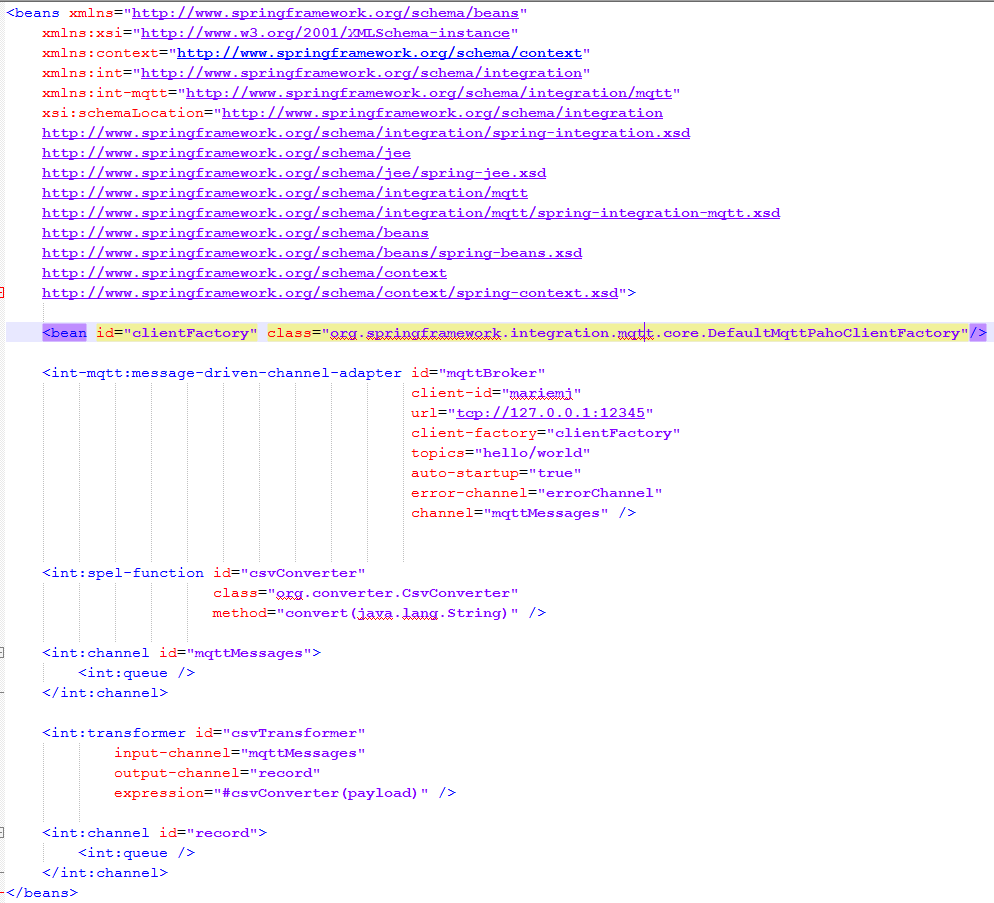
Working with Spring Integration, the use of Mqtt become very easy. In fact we need only to declare an int-mqtt:message-driven-channel-adapter in the applicationContext or spring-integration-context.xml

The code is :


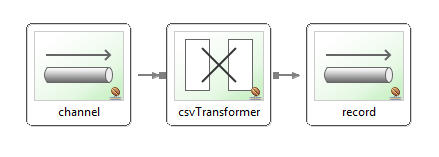
The integration graph looks then like this :

So in order to convert the message coming from the broker (in CSV format), we need to call the method convert in the created CsvConverter class. In order to configure this using int:transformer, we need to declare a spel-function where we specify the class and called method, then we use the Id inside the spEL expression inside the transformer by putting # before the id of the converter.
so here is the code.

<int:spel-function id="csvConverter" class="org.converter.CsvConverter" method="convert(java.lang.String)" />

<int:transformer id="csvTransformer"
input-channel="mqttMessages"
output-channel="record" expression="#csvConverter(payload)" />

So now the transformer will call the CSVConverter which will convert the mqtt message payload from CSV to Java Bean (here Record).  The conversion is done using CSVeed framework which construct the given bean from the csv message.


Spring integration Channel Queue Get the current queue size (queue monitoring)

Using Spring-integration (version 4.0.0.M4), I was using a channel Queue where I Put Mqtt Messages. Multi-threads will take messages from that queue in order to process them.
I needed to know the size of the Queue and to Log it. Warning may be logger if the Queue is reaching some threshold.

So my code look like this:
In the spring-integration.xml  (or applicationcontext.xml), I have declared my channel having a Queue.


No in my Code, I use :

@Qualifier(value="mqttMessages")
@Autowired(required=false)
QueueChannel  queue;

So I get the channel by its Id. So now I can get the Channel Queue Size using :
queue.getQueueSize()

Sunday, April 13, 2014

Spring JdbcTemplate/ NamedJdbcTemplate tutorial : Resolve Date insertion

I was working with Spring JdbcTemplate to insert rows in the data base. My query is:
insert into person (person_id, name, birth_date) values(?, ?, ?)

@Autowired
JdbcTemplate jdbcTemplate;
private String query ="insert into person (person_id, name, birth_date) values(?, ?, ?)"

public void store(Person person){

       jdbcTemplate.update(query , person.getId(), person.getName(), person.getBirthDate());

}

Using this code, I get this error

 org.springframework.jdbc.BadSqlGrammarException: PreparedStatementCallback; bad SQL grammar [insert into
...]
; nested exception is org.postgresql.util.PSQLException: ERROR: column "birth_date" is of type timestamp with time zone but expression is of type character varying

So the database is not accepting the java.util.Date.
Next olution is to use the DATE '2004-02-02' of postgres, so I have modified my query:
insert into person (person_id, name, birth_date) values(?, ?, DATE ?)

So even with this modification I got :
nested exception is org.postgresql.util.PSQLException: ERROR: syntax error at or near "$3"

Ok, so maybe I need to add qotes. My query is now :
insert into person (person_id, name, birth_date) values(?, ?, DATE '?')
This didn't resolve the problem and I got this error:
PSQLException: The column index is out of range: 3, number of columns: 2

Ok, so my last chance is to use NamedParameterJdbcTemplate.
I have modified my code:
1- In the aplicationContext, I added:

<bean id="namedJdbcTemplate" class="org.springframework.jdbc.core.namedparam.NamedParameterJdbcTemplate" >
        <constructor-arg ref="myDataSource" />
</bean>

2- In my code :

@Autowired
protected NamedParameterJdbcTemplate namedJdbcTemplate;

        private String query ="insert into person (person_id, name, birth_date) values(:id, :name, :birthDate)";

public void store(Person person){

       MapSqlParameterSource params = new MapSqlParameterSource();
   params.addValue("id", person.getId());
       params.addValue("name",  person.getName());
       params.addValue("birthDate", person.getBirthDate(), Types.DATE);
       jdbcTemplate.update(query , params);

}

Adding the Types.DATE ( don't forget to import java.sql.Types;), has resolved the problem, and now the insertion is working without any ProBleM ;)


Thursday, April 3, 2014

Spring-integration-mqtt development and resolve MessageDispatchingException Dispatcher has no subscribers

I was using Spring-Integration-Mqtt in order to get messages from the mqtt Broker.


But while testing my application, I got this exception:

 org.springframework.integration.MessageDispatchingException: Dispatcher has no subscribers
at org.springframework.integration.dispatcher.UnicastingDispatcher.doDispatch(UnicastingDispatcher.java:107) [spring-integration-core-4.0.0.M4.jar:]
at org.springframework.integration.dispatcher.UnicastingDispatcher.dispatch(UnicastingDispatcher.java:97) [spring-integration-core-4.0.0.M4.jar:]
at org.springframework.integration.channel.AbstractSubscribableChannel.doSend(AbstractSubscribableChannel.java:77) [spring-integration-core-4.0.0.M4.jar:]
... 10 more

Although the sent messages were received, I got the error. After some investigation, I have found that the problem don't come from spring-mqtt but from my side.
In fact by error, I have declared the service-activator and another bean  with the same Id.

So, If you have this error, make sure that your integration.xml (or applicationContext.xml) is correct.

Now, in order to take benefit from mqtt using Spring, you need to use spring-integration-mqtt and just configure few lines.

The Pom looks like this (if you have problem to locate the remote repository, see this post) :


And the intergration.xml:


Tuesday, March 4, 2014

Resolve org.springframework.beans.factory.NoSuchBeanDefinitionException: No bean named 'transactionManager' is defined

When testing my application, an error appear :

 org.springframework.beans.factory.NoSuchBeanDefinitionException: No bean named 'transactionManager' is defined

In fact, in the ApplicationContext, I am defining the transaction manager with another name:
<bean id="myTxManager" class="org.springframework.orm.jpa.JpaTransactionManager">

So, as Spring is checking for the default name, I just put it in my configuration.
<bean id="transactionManager" class="org.springframework.orm.jpa.JpaTransactionManager">

I have seen that it is possible to use another name, nut you should sepcify it in the @Transactional annotation:
@Transactional(value="myTxManager")

Now it is working ;)

Monday, March 3, 2014

Resolved: Entity Manager cannot persist entities in database

I was developing a DAO layer using JPA specification (with JTA transaction managed by  Spring). When I tried to insert a new entity. I was using a shared entity manager and managing my transaction like this.

@PersistenceContext
private EntityManager entityManager;


entityManager.getTransaction().begin();

.....
entityManager.getTransaction().commit(); 

Once tested, I had this error:
 java.lang.IllegalStateException: Not allowed to create transaction on shared EntityManager - use Spring transactions or EJB CMT instead
at org.springframework.orm.jpa.SharedEntityManagerCreator$SharedEntityManagerInvocationHandler.invoke(SharedEntityManagerCreator.java:220) [spring-orm-4.0.1.RELEASE.jar:4.0.1.RELEASE]
at $Proxy82.getTransaction(Unknown Source)

So I should use Spring Transactions. I had thus added @Transaction annotation to my method, and removed the getTransaction..  I also added flush in order to "commit" the work.

entityManager.persist(item);
entityManager.flush(); 

But it didn't work and I have this error in  my log.
entitymanager persist no transaction is in progress

So I think my @Transaction annotations are not taken into consideration and thus transactions are not initialized.
So in order to solve this problem I have added this line in my applicationContext
< tx:annotation-driven/>

(as I am using jndi entitymanagerfactory lookup, I have this :
<tx:jta-transaction-manager/>)

The problem is so resolved :)

Tuesday, February 18, 2014

Tutorial Java Persistence Api with Hibernate4, Spring 4 and Jboss eap 6.2 (Entity generation)


Today we will work on the creation of a web project with these properties:
- Server JBoss eap6.2
- Database Postgres 9.2
- Relational mapping : Use of Hibernate 4
- Spring 4
- Maven

Once my database is designed, comes the choice of the ORM. I have chosen the JPA specification with Hibernate implementation.

Step1: create a dynamic web project 


Convert the project to Maven project. Then use the same steps to convert it to JPA project.


Select the version of JPA and Java.


Be sure that Hibernate (JPA 2.1) is selected.


After downloading Spring tools in eclipse, you can add Spring nature to the project:


Step 2: Configure the JBoss EAP 6.2 server 

Now we will add a server on which our application will run. So let's use the JBoss EAP 6.2


If you don't have an environment runtime, you can configure it by specifying the your server directory


Make sure that you are specifying the right JDK


I have also downloaded JBoss eap 6.2 repository as I am using Maven.
I am using JBoss which comes with Hibernate, JPA..., so I will use these modules as JBoss load them implicitly.
My initial pom.xml looks like this 


Step3: Datasource Configuration

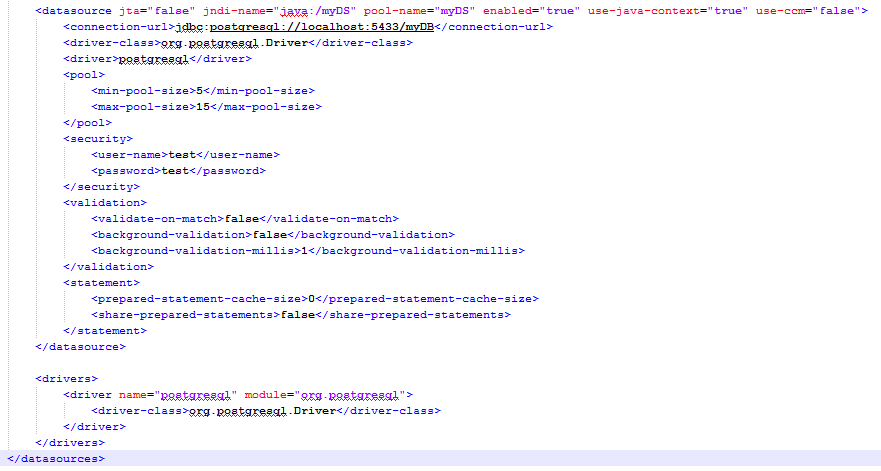
Now that the server is created, we will configure the datasource. This is no more done in separate file *-ds.xml as in previous versions of JBOss. It is done in the  C:\EAP-6.2.0\jboss-eap-6.2\standalone\configuration\standalone.xml file. 


You should add the JDBC Dirver (for me it is postgresql-9.2-1004.jdbc4.jar) in JBoss modules. So create this folder hierarchy: org\postgresql\main inside JBoss modules folder: C:\EAP-6.2.0\jboss-eap-6.2\modules\system\layers\base\. Copy then your driver and create module.xml


Step4: Setting the persistence.xml

Now we will configure the persistence.xml setting file located under src/META-INF folder 
JPA implementations allow the developer to chose between a JTA or RESOURCE_LOCAL transaction management.
The Java Transaction API (JEE APi ) enables distributed transactions to be done across multiple resources in Java. JBoss server supports JTA transactions.
RESOURCE_LOCAL is using basic JDBC level transactions, thus it is not possible to span a transaction among multiple persistence unit.


Once created, use Window-> Open perspective -> Others -> Hibernate. If every think is weel done, you can see table in your DB


Step 5: Fix the connection with the Database.

Now go to window -> Perspective -> Hibernate. The defined datasource will be there. Double clic on it. I have and error: 
"org.Hibernate.console.HibernateConsoleRuntimeException: Could not create JPA based Configuration"

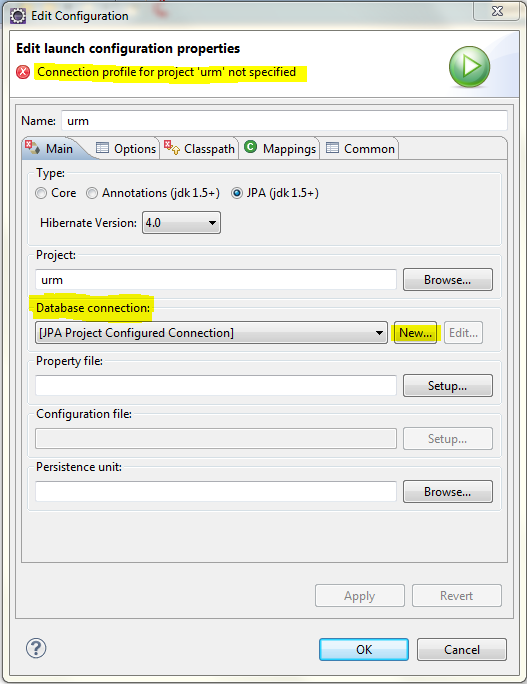
In fact I think I should configure the connection by specifying my Driver ... So rigth clic on the configuration and edit it.


We should specify the driver. By default eclipse comes with version 8. As my database is 9.2, I should remove that driver and add postgres9.2.

Specify the Driver location. Make sure then that the properties are well specified.


After adding the driver, properties, press OK. You can then validate the connection.


It seems that there is a problem in eclipse with JPA project and Hibernate tools. So we cannot visulaize our tables. 
EDIT: See this link to Resolve this Classpath problem and generate tables.
Don't worry, I have found the solution ;) Great.
Ok so now in order to generate tables.


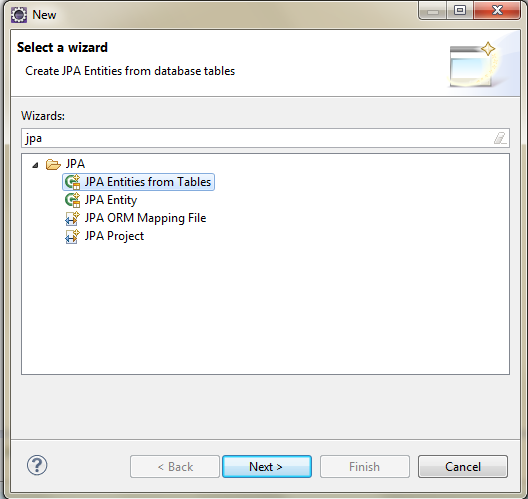
Once the tables selected, you can go ehead in the creation and entities will be ready for use.

Soon I will finish this tutorial with spring config....

Step 5: Spring


So first thing to do is to add maven dependency to spring-orm. Next create the spring configuration file,  applicationContext.xml.


Once the name specified, you can chose the XSD namespaces which will be used and their versions.


According to the Spring 4 documentation "Using the LocalContainerEntityManagerFactoryBean" is the most powerful JPA setup option, allowing for flexible local configuration within the application. In fact, using org.springframework.orm.jpa.LocalEntityManagerFactoryBean, developer isn't able to refer to an existing JDBC Datasource bean definition neither support global transactions.
so finally, my ApplicationContext.xml is:


Articles les plus consultés