Showing posts with label JBoss EAP 6. Show all posts

Tuesday, November 4, 2014

JBoss 7 : Set JAVA_OPTS in JBoss standalone.sh

I was working with a JBoss EAP 6 server (based on JBoss As7). This latest is installed on Linux server.

As the allocated memory is not enough, I wanted to add more space. To do so, you think first of modifying the JAVA_OPTS in standalone.sh. But this will not be taken in account.

The solution is in fact to change these JAVA_OPTS parameters in standalone.conf located in jboss-eap-6.2/bin/.


Don't forget to share ...  

Monday, October 27, 2014

JBoss 7 WSConsume with Maven : Generate Web Service Client with WSconsume

I have an application running on JBoss EAP 6. I wants to cnsume a Web service. So I need to generate Web Service Client using maven. For that reason I need to declare this lines in my pom.xml :


 1
 2
 3
 4
 5
 6
 7
 8
 9
10
11
12
13
14
15
16
17
18
19
20
21
22
23
24
25
26
27
28
29
30
31
32
33
34
35
36
37
38
39
40
41
42
43
44
45
46
47
48
49
50
51
52
53
54
55
56
57
58
59
60
61
62
63
64
65
<dependencies>
 <dependency>
  <groupId>org.jboss.ws.cxf</groupId>
  <artifactId>jbossws-cxf-client</artifactId>
  <version>4.1.1.Final</version>
  <scope>provided</scope>
 </dependency>

</dependencies>

<plugins>
 <plugin>
  <groupId>org.jboss.ws.plugins</groupId>
  <artifactId>maven-jaxws-tools-plugin</artifactId>
  <version>1.1.1.Final</version>
  <executions>
   <execution>
    <id>myService</id>
    <goals>
     <goal>wsconsume</goal>
    </goals>
    <configuration>
     <wsdls>
     
      <wsdl>http://localhost:8080/test_project/myService.ws?wsdl</wsdl>
      <wsdl>http://localhost:8080/test_project/mySecondService?wsdl</wsdl>
     </wsdls>
     <targetPackage>org.dcp.clients.myservice</targetPackage>
     <sourceDirectory>${project.basedir}/src/main/java
     </sourceDirectory>
     <extension>true</extension>
     <verbose>true</verbose>
     <goalPrefix>wsconsume</goalPrefix>
    </configuration>
   </execution>

   <execution>
    <id>userService</id>
    <goals>
     <goal>wsconsume</goal>
    </goals>
    <configuration>
     <wsdls>
      <wsdl>http://localhost:8080/user_project/UserService.ws?wsdl</wsdl>
     </wsdls>
     <targetPackage>org.dcp.clients.userservice</targetPackage>
     <sourceDirectory>${project.basedir}/src/main/java
     </sourceDirectory>
     <extension>true</extension>
     <verbose>true</verbose>
     <goalPrefix>wsconsume</goalPrefix>
    </configuration>
   </execution>
  </executions>
 </plugin>

 <plugin>
  <groupId>org.apache.maven.plugins</groupId>
  <artifactId>maven-war-plugin</artifactId>
  <configuration>
   <failOnMissingWebXml>false</failOnMissingWebXml>
  </configuration>
 </plugin>

</plugins>


So next, just need to run clean install and all the classes will be generated. Some problems may accur when your web service throws some User Exceptions. This will be discussed later.


Monday, September 22, 2014

Jboss EAP 6 : Remote Access to Admin Console and To Web Services in JBoss AS 7 / JBoss EAP 6

By default, JBoss can be accessed only locally using the address 127.0.0.1. So I wasn't able to access the console neither to the web Services (once the application deployed, coming below).
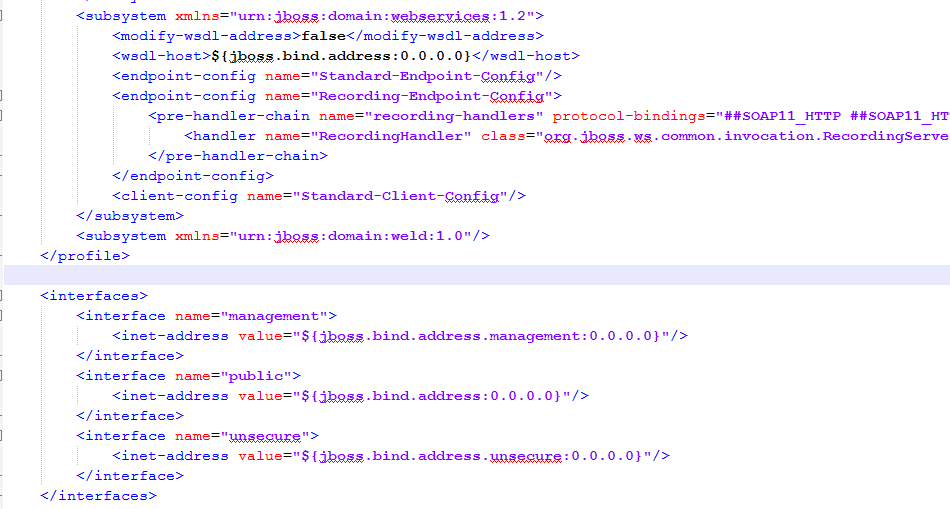
To fix that, we need to make some changes in the "jboss-eap-6.2/standalone/configuration/standalone.xml" where I change the IP addresses from 127.0.0.1 to 0.0.0.0. Like this, JBoss will accept remote call to the Console and to the Web Services.

If your Server is locally, there is no need for this Step and go directly to /jboss-eap-6.2/standalone/configuration/Standalone.xml.

ELSE  :
In order to make it easy to edit remote files, configure FileZilla to edit your files using your favorite program. So in FileZilla go to Edit->Settings and choose you program.


Then:
Come back to Standalone.xml, it should look like this:

So all the addresses are 0.0.0.0.

Now you will be able to access remotely to your Console and to your WSDLs.


Thursday, May 15, 2014

Spring Tutorial : Develop your Software based on Spring 4, JPA 2.0 and JBoss EAP 6.2 / JBoss AS 7.3

I will speak today about how can we integrate Spring 4 with JBoss AS 7 (JBoss EAP 6). 

Step 1 : Persistence.xml

The persistence.xml creation will depend on weather the Entity Manager will be managed by the container (JBoss so JPA 2.0) or by Spring (Where we will use JPA 2.1).

- JBoss manage the EntityManager: Use of JPA 2.0 with JTA transaction Type

In this case, the Transaction Type must be JTA. JBoss EAP 6.2 (based on JBoss 7.3) comes with JPA2.0 :


 1
 2
 3
 4
 5
 6
 7
 8
 9
10
11
12
13
14
<?xml version="1.0" encoding="UTF-8"?>
<persistence version="2.0" 
xmlns="http://java.sun.com/xml/ns/persistence"
xmlns:xsi="http://www.w3.org/2001/XMLSchema-instance" 
xsi:schemaLocation="http://java.sun.com/xml/ns/persistence http://java.sun.com/xml/ns/persistence/persistence_2_0.xsd">
    <persistence-unit name="module_enterprise" transaction-type="JTA">
  <jta-data-source>java:/myDS</jta-data-source>   
   <properties> 
   <property name="hibernate.dialect" value="org.hibernate.dialect.PostgreSQLDialect"/>
   <property name="hibernate.show_sql" value="true" />
   <property name="hibernate.hbm2ddl.auto" value="validate"/>
  </properties>
 </persistence-unit>  
</persistence>

- Spring manage the EntityManager: Use of JPA2.0 with RESOURCE_LACAL transaction type


As we need to let Spring manage the persisitence unit and e want to use RESOURCE_LOCAL transaction type, we need to exclude JPA and Hibernate coming from JBoss.
So the steps are:
- Create a jpa-persistence.xml. In the case where you don't want that JBoss inject its own libraries, it is better to change the name of the persistence.xml ( JBoss will load JPA implicitely if it detects perssistence.xml file).

- Use RESOURCE_LOCAL and not JTA, if you don't really need to access multiple data sources

- Use "org.hibernate.jpa.HibernatePersistenceProvider" as a provider

- Add a property in the persistence.xml
<property name="jboss.as.jpa.managed" value="false"/>

In fact, according to JBoss Reference, jboss.as.jpa.managed can be set to false to disable container managed JPA access to the persistence unit.  The default is true, which enables container managed JPA access to the persistence unit.  This is typically set to false for Seam 2.x + Spring applications. 


 1
 2
 3
 4
 5
 6
 7
 8
 9
10
11
12
13
14
15
16
17
18
19
<?xml version="1.0" encoding="UTF-8"?>
<persistence version="2.0" xmlns="http://java.sun.com/xml/ns/persistence" xmlns:xsi="http://www.w3.org/2001/XMLSchema-instance" 
xsi:schemaLocation="http://java.sun.com/xml/ns/persistence http://java.sun.com/xml/ns/persistence/persistence_2_0.xsd">
<!-- <persistence version="2.1"
    xmlns="http://xmlns.jcp.org/xml/ns/persistence"
    xmlns:xsi="http://www.w3.org/2001/XMLSchema-instance"
    xsi:schemaLocation="http://xmlns.jcp.org/xml/ns/persistence 
    http://xmlns.jcp.org/xml/ns/persistence/persistence_2_1.xsd"> -->
    <persistence-unit name="module_enterprise" transaction-type="RESOURCE_LOCAL">
  <provider>org.hibernate.jpa.HibernatePersistenceProvider</provider>
  <non-jta-data-source>java:/myDataSource</non-jta-data-source>   
   <properties> 
   <property name="jboss.as.jpa.managed" value="false" />
   <property name="hibernate.dialect" value="org.hibernate.dialect.PostgreSQLDialect"/>
   <property name="hibernate.show_sql" value="true" />
   <property name="hibernate.hbm2ddl.auto" value="validate"/>
  </properties>
 </persistence-unit>  
</persistence>

Step 2 : Spring Configuration

Same think here: 

- JBoss manage the EntityManager or EntityManagerFactory and Spring have just the jndi name. Transaction Type here must be JTA. The ApplicationContext looks like this:


 1
 2
 3
 4
 5
 6
 7
 8
 9
10
11
12
13
14
15
16
17
18
19
20
<?xml version="1.0" encoding="UTF-8"?>
<beans xmlns="http://www.springframework.org/schema/beans"
 xmlns:xsi="http://www.w3.org/2001/XMLSchema-instance"
 xmlns:context="http://www.springframework.org/schema/context"
 xmlns:jee="http://www.springframework.org/schema/jee"
 xmlns:tx="http://www.springframework.org/schema/tx"
 xsi:schemaLocation="http://www.springframework.org/schema/beans http://www.springframework.org/schema/beans/spring-beans.xsd
 http://www.springframework.org/schema/context http://www.springframework.org/schema/context/spring-context.xsd
 http://www.springframework.org/schema/jee http://www.springframework.org/schema/jee/spring-jee.xsd
 http://www.springframework.org/schema/tx http://www.springframework.org/schema/tx/spring-tx.xsd">

 <!-- post-processors for all standard config annotations -->
 <tx:annotation-driven />
 <context:annotation-config />
 <context:component-scan base-package="org.test"/>
 
 <jee:jndi-lookup id="myDataSource" jndi-name="java:/myDS"/>
 <jee:jndi-lookup id="entityManagerFactory_module" jndi-name="java:comp/env/test/myfact"  expected-type="javax.persistence.EntityManagerFactory"/>   
 <tx:jta-transaction-manager/>
</beans> 


In this case, the application uses a server-deployed persistence unit. Thus the javax.persistence classes and the persistence provider (Hibernate) are contained in modules in JBoss ( in JBOSS_HOME\modules\system\layers\base\javax\persistence\api\main) and added automatically by the application while the deployment (When detecting the persistence.xml or persistence-unit, JBoss inject implicitly Hibernate).
So using the server-deployed persistence unit, you need also to declare the JNDI persistence context in the Web.xml:
NB: The persistence-unit-name specified in web.xml should be the same  in perssitence.xml file  ( <persistence-unit name="module_enterprise" )


 1
 2
 3
 4
 5
 6
 7
 8
 9
10
11
12
<?xml version="1.0" encoding="UTF-8"?>
<web-app version="3.0" xmlns="http://java.sun.com/xml/ns/javaee" xmlns:xsi="http://www.w3.org/2001/XMLSchema-instance" xsi:schemaLocation="http://java.sun.com/xml/ns/javaee
http://java.sun.com/xml/ns/javaee/web-app_3_0.xsd" metadata-complete="true">

 <listener>
  <listener-class>org.springframework.web.context.ContextLoaderListener</listener-class>
 </listener>
 <persistence-unit-ref>
  <persistence-unit-ref-name>test/myfact</persistence-unit-ref-name>
  <persistence-unit-name>module_enterprise</persistence-unit-name>
 </persistence-unit-ref>
</web-app>

Note here that the name that we have declared in the application context is java:comp/env/test/myfact, and in the web.xml, we need to put just test/myfact

If Spring cannot find the Default JBoss transaction Manager, you can guide it like explained in this post.

- Spring manage the EntityManager.

Using JPA2.0, we can enable the JPA in JBoss and use the first possibility. But as we have disabled JPA in JBoss, Spring is now responsible of creating th Transaction and the EntityManagerFactory.
My applicationContext looks like this:


 1
 2
 3
 4
 5
 6
 7
 8
 9
10
11
12
13
14
15
16
17
18
19
20
21
22
23
24
25
26
27
28
29
30
31
32
33
34
35
<?xml version="1.0" encoding="UTF-8"?>
<beans xmlns="http://www.springframework.org/schema/beans"
 xmlns:xsi="http://www.w3.org/2001/XMLSchema-instance"
 xmlns:context="http://www.springframework.org/schema/context"
 xmlns:jee="http://www.springframework.org/schema/jee"
 xmlns:tx="http://www.springframework.org/schema/tx"
 xsi:schemaLocation="http://www.springframework.org/schema/beans http://www.springframework.org/schema/beans/spring-beans.xsd
 http://www.springframework.org/schema/context http://www.springframework.org/schema/context/spring-context.xsd
 http://www.springframework.org/schema/jee http://www.springframework.org/schema/jee/spring-jee.xsd
 http://www.springframework.org/schema/tx http://www.springframework.org/schema/tx/spring-tx.xsd">

 <!-- post-processors for all standard config annotations -->
 <tx:annotation-driven />
 <context:annotation-config />
 <context:component-scan base-package="org.test"/>
 
 <jee:jndi-lookup id="myDataSource" jndi-name="java:/myDataSource"/>
 
 <bean id="emfEnterprise" class="org.springframework.orm.jpa.LocalContainerEntityManagerFactoryBean">
  <property name="dataSource" ref="myDataSource" />
  <property name="jpaVendorAdapter" ref="jpaAdapter" />
  <property name="persistenceUnitName" value="module_enterprise"/>
   <property name="persistenceXmlLocation" value="classpath*:META-INF/jpa-persistence.xml"/>  
 </bean> 
 
 <bean id="mddEnterpriseTxManager" class="org.springframework.orm.jpa.JpaTransactionManager">
  <property name="entityManagerFactory" ref="emfEnterprise" />
 </bean> 

  <bean id="jpaAdapter" class="org.springframework.orm.jpa.vendor.HibernateJpaVendorAdapter">
        <property name="showSql" value="true" />
        <property name="generateDdl" value="true" />
        <property name="databasePlatform" value="org.hibernate.dialect.PostgreSQLDialect" />
    </bean>
</beans>


That's all, so now you are able to integrate JBoss with Spring either by allowing JBoss manage your persistence unit or by letting only Spring doing this and EXCLUDE JBOSS JPA and Hibernate modules.


Tuesday, May 6, 2014

Resolved : Logging in Jboss EAP 6 (JBoss AS7), Spring using Log4j

I was for a good time wondering why my Log4j is logging only the messages coming from my classes but not frameworks like  Spring, JDBC Template, CSveed. Every think was well configured, no error messages but I see framework messages only in the server.log.


So finally, I found the right steps to do.

Step 1:


Exclude Logging from JBoss. This previous article explains how to do.
So here is my jboss-deployment-structure.xml :


 1
 2
 3
 4
 5
 6
 7
 8
 9
10
11
<jboss-deployment-structure>
 <deployment>
 <!-- Add this line in the server lauch parameter : -Dorg.jboss.as.logging.per-deployment=false -->
  <exclusions>
   <module name="org.apache.log4j"/>
   <module name="org.apache.commons.logging"/>
              <module name="org.slf4j" />
             <module name="org.slf4j.impl" />
  </exclusions>   
 </deployment>
</jboss-deployment-structure>

Step 2:


Put you log4j.xml or log4j.properties in your classpath. In a Maven project, it should be under "\src\main\resources". Othrwhise, you can fix the classpath in the web.xml


1
2
3
4
5
6
7
8
<listener>
 <listener-class>org.springframework.web.util.Log4jConfigListener</listener-class>
</listener>

<context-param>
 <param-name>log4jConfigLocation</param-name>
 <param-value>classpath:/main/resources/META-INF/log4j.xml</param-value>
</context-param>


Step 3:

So Now, we need to add the required jar, AND Exclude some Jars. In the pom.xml, we need to exclude commons-logging from Spring-context jar and we need to add slf4j-api, slf4j-log4j12, jcl-over-slf4j, log4j.


 1
 2
 3
 4
 5
 6
 7
 8
 9
10
11
12
13
14
15
16
17
18
19
20
21
22
23
24
25
26
27
28
29
30
31
32
33
34
<dependency>
 <groupId>org.springframework</groupId>
 <artifactId>spring-context</artifactId>
 <version>${spring.version}</version>
 <exclusions>
  <exclusion>
   <artifactId>commons-logging</artifactId>
   <groupId>commons-logging</groupId>
  </exclusion>
 </exclusions>
</dependency>
<dependency>
 <groupId>org.slf4j</groupId>
 <artifactId>slf4j-api</artifactId>
 <version>${slf4j-log4j12.version}</version>
 <scope>runtime</scope>
</dependency>
<dependency>
 <groupId>org.slf4j</groupId>
 <artifactId>slf4j-log4j12</artifactId>
 <version>${slf4j-log4j12.version}</version>
 <scope>runtime</scope>
</dependency>
<dependency>
 <groupId>org.slf4j</groupId>
 <artifactId>jcl-over-slf4j</artifactId>
 <version>${slf4j-log4j12.version}</version>
 <scope>runtime</scope>
</dependency>
<dependency>
 <groupId>log4j</groupId>
 <artifactId>log4j</artifactId>
 <version>${log4j.version}</version>
</dependency>

So this step was the latest and Important step that I have discovered and which blocked my logging before.

Sunday, May 4, 2014

Resolve JBoss Startup Failure due to a missing deployment

On JBoss startup, I get one time this kind of error:


ERROR [org.jboss.as.controller.management-operation] (Controller Boot Thread) JBAS014613: Operation ("add") failed - address: ([("deployment" => "myproject.war")]) - failure description: "JBAS018717: No deployment content with hash dcb4683c68f8ef7f07383bc7e0e0d3f039632c5f is available in the deployment content repository for deployment 'myproject.war'. This is a fatal boot error. To correct the problem, either restart with the --admin-only switch set and use the CLI to install the missing content or remove it from the configuration, or remove the deployment from the xml configuration file and restart."

In fact, Jboss tried to start but didn't find my war (myproject.war) in jbossHome/standalone/deployments.

In order to fix this error, you need to go to the standalone.xml, I have two deployments entries(app.war which don't cause error and myproject.war), and the one who is missing is myproject.war. So all what I need to do is to remove this entry.


1
2
3
4
5
6
7
8
    <deployments>
        <deployment name="app.war" runtime-name="app.war">
            <content sha1="e976bdb628576b38ac1bdee7299c55441807aa8d"/>
        </deployment>
        <deployment name="myproject.war" runtime-name="myproject.war">
            <content sha1="dcb4683c68f8ef7f07383bc7e0e0d3f039632c5f"/>
        </deployment>
    </deployments>


1
2
3
4
5
    <deployments>
        <deployment name="app.war" runtime-name="app.war">
            <content sha1="e976bdb628576b38ac1bdee7299c55441807aa8d"/>
        </deployment>
    </deployments>

Now my JBoss starts with no problems. NB : If you need to remove ALL the DEPLOYMENTS, do it but don't remove the <deployments>

Saturday, April 26, 2014

Resolve TransactionManager lookup fails on JBoss EAP 6 (AS7): No JTA TransactionManager found at fallback JNDI location (NameNotFoundException)

Using JBoss EAP 6.2, I have an application running on it. I needed to exclude the JBoss Logging as explained in this link.
So adding the exclusion in the jboss-deployment-structure.xml I have errors.

 javax.naming.NameNotFoundException: TransactionManager -- service jboss.naming.context.java.module.myprojectname.TransactionManager
org.springframework.transaction.jta.JtaTransactionManager] No JTA TransactionManager found at fallback JNDI location [java:appserver/TransactionManager]
 javax.naming.NameNotFoundException: java:appserver/TransactionManager
javax.naming.NameNotFoundException: java:pm/TransactionManager

Oh oOh what happens. Ayyy. Jboss is angry because I have excluded its logging :|. Ok I will not use the Jboss logging even if it is not happy for that.
So now I need to fix the jndi lookup of the jboss transaction manager. If you look in Standalone.xml, you will not find this jndi name. Strange no !! In fact by default it is java:jboss/TransactionManager.

So all what I need now is to specify to Spring the name of my Transaction Manager. So first, I have removed the old declaration :


<tx:jta-transaction-manager/>

And I substitute it by : 


1
2
3
<bean id="transactionManager" class="org.springframework.transaction.jta.JtaTransactionManager">
       <property name="transactionManagerName" value="java:jboss/TransactionManager"/>
</bean>

And now every think is working and I can see in the log while deploying :

DEBUG org.springframework.transaction.jta.JtaTransactionManager  - Retrieving JTA TransactionManager from JNDI location [java:jboss/TransactionManager]

Monday, April 21, 2014

Resolve Error: org/springframework/cglib/transform/impl/MemorySafeUndeclaredThrowableStrategy

I was working on a web application using Spring application.

When deploying my application on JBoss eap 6.2 Server, I got this Error :

Caused by: java.lang.NoClassDefFoundError: org/springframework/cglib/transform/impl/MemorySafeUndeclaredThrowableStrategy
at org.springframework.aop.framework.CglibAopProxy.getProxy(CglibAopProxy.java:187) [spring-aop-3.2.8.RELEASE.jar:3.2.8.RELEASE]
...
Caused by: java.lang.ClassNotFoundException: org.springframework.cglib.transform.impl.MemorySafeUndeclaredThrowableStrategy from [Module "deployment.dbm.war:main" from Service Module Loader]
at org.jboss.modules.ModuleClassLoader.findClass(ModuleClassLoader.java:197) [jboss-modules.jar:1.3.0.Final-redhat-2]

It was strange as I was using Spring Integration 3.0.2.RLEASE.

<dependency>
<groupId>org.springframework.integration</groupId>
<artifactId>spring-integration-core</artifactId>
<version> 3.0.2.RELEASE</version>
</dependency>

As I have then used the 4.0.0.M4 version of Spring-Integration. So I have decided to use it and once updated the web application was deploying with success.

<repositories>
<repository>
<id>spring-milestones</id>
<url>http://repo.springsource.org/libs-milestone/</url>
</repository>
</repositories>
<dependencies>
<dependency>
<groupId>org.springframework.integration</groupId>
<artifactId>spring-integration-core</artifactId>
<version>4.0.0.M4</version>
</dependency>

Tuesday, April 1, 2014

Install and Deploy applications remotely with JBoss eap 6 (JBoss AS7)

This time I will show you how to install, deploy and Test an application remotely on JBoss EAP 6.2, few steps should be done:

Step1: Install JBoss on the remote server.

In order to do that, you need FileZilla and Putty (to execute commands).
So first connect to the remote server using FileZilla. You can put directly your installed JBoss on the remote server or install a new one. Here I will not copy my working one, but I will take the second choice.
So I download the JBoss EAP 6 jar and transfer it to the server.


Then using Putty connect also the server (using an admin account).
Once connected execute these commandes:
java -version
At least you need the version 1.6 of Java.

mvn --version
At leat you need version 3.0

unzip jboss-eap.6.x.x.jar

JBoss will be then installed. So next run it. To do so go to jboss-eap.6.x/bin folder then execute ./standalone.sh. Your server should run without error.

In order to access the console, you need to create a client accout. So using putty and being in the bin folder, execute the command ./addUser.sh.  Then follow the instructions (I used the managementRealm). This account will be used in the console.


Step2: Configure you JBoss.

Now, if you have added some modules to your server like jdbc, or dataSource definition don't forget to add them. So using FileZilla, you can add the new module. For me it was "C:\jboss-eap-6.2\modules\system\layers\base\org\postgresql".
Don't forget also to configure the Standalone.xml with your DataSource and especially give the address where you dataBase is running (my dataBase is running on the same server).

Step3: Configure Remote access to the Console and Web Services.

By default, JBoss can be accessed only locally using the address 127.0.0.1. So I wasn't able to access the console neither the webservices (once the application deployed, coming below).
To fix that, we need to make some changes in the "jboss-eap-6.2/standalone/configuration/standalone.xml" where I change the IP addresses from 127.0.0.1 to 0.0.0.0. Like this, JBoss will accept remote call to the Console and to the Web Services.

In order to make it easy to edit remote files, configure FileZilla to edit your files using your favorite program. So in FileZilla go to Edit->Settings and choose you program.


Then:
Come back to Standalone.xml, it should look like this:

So all the addresses are 0.0.0.0.

Step4: Generate the war.


Before deploying the application, you should first generate the war. This cone be done using ant, or using eclipse. So right clic on the project, and Export.


Choose where to save this war locally.

Step5: Deploy the application

It is time to deploy the application. In order to do that (using the console). So use the adress (put your server address instead of "remoteServerAddress"): 
http://remoteServerAddress:9990/console.
Once connected, go to ManageDeployment section. You need to specify your war location. 


Once added, clic on En/Disable in order to enable it and deploy it on the server.


Now you application is ready to be tested.

Step6: Test the application

As my application is a Web service, I need only the address of the WSDL wich I will put in SoapUI. So clic on the deployed war -> webservices and you will have details about the WSDL...
Just create a new project in SoapUI and specify the address of the WSDL.


That's all for today, I hope really that it helped you :)

Tuesday, March 25, 2014

JPA 2.0 Criteria Query/Builder DELETE : Typesafe DELETE queries

JPA 2.0 don't provide a dynamic way to write delete queries. In fact we can only write a type safe queries for the SELECT but not for the DELETE and Update.

JPA 2.1 provides this possibility using  CriteriaUpdate and CriteriaDelete. You can have more details in this link.


But actually, as I am obliged to use JPA 2.0 which comes with JBoss eap 6, and waiting for JPA 2.1, I should use the native queries.

So the problem here is that I have multiple lists that I should use in the query and that may be null.

Query query = entityManager.createNativeQuery("DELETE FROM person_record pr WHERE pr.person.person_id IN (select person_id from person p WHERE p.age IN ?1 AND p.job IN  ?2 ");

query.setParameter(1, ageList);
query.setParameter(2, jobList);

Here I am using a SELECT subquery. In fact if I use this query,

DELETE.... Where pr.person.age IN ?1

Hibernate will not accept it and throw an exception.

Problem:

The problem with the first query is that when ageList or the jobList is null, nothing will be returned. So we should put the parameter only if it is not null. We can so create a StringBuilder and put the first part of the request and according to what parameter we have, we create the rest of the query.

Solution: 

But a more safe think to do is to use the Criteria Builder in order to select the rows to delete, then delete the rows using entityManager.remove(entity). This is also very useful if we need to do a Cascade DELETE.

So the first think is to do like this:

CriteriaBuilder builder = entityManager.getCriteriaBuilder();
CriteriaQuery query = builder.createQuery(PersonRecord.class);
Root root = query.from(PersonRecord.class);

List predicateList = new ArrayList();

if(ageList != null && !ageList .isEmpty()){
predicateList.add(builder.isTrue(root.get("person").get("age").in(ageList )));
}
if(jobList!= null && !jobList.isEmpty()){
predicateList.add(builder.isTrue(modelTypeRoot.get("person").get("job").in(jobList)));
}

query.where(builder.and(predicateList.toArray(new Predicate[predicateList.size()])));

List personToDelete= entityManager.createQuery(query).getResultList();

for(PersonRecord item:personToDelete){
       // Make the entity attached again
entityManager.merge(item);
      // Here a CASCADE remove will be done easily
entityManager.remove(item);
}

This is only a temporarely solution till we will get the JBoss EAP with JPA 2.1


Tuesday, March 4, 2014

Use JBoss JPA 2.1 and Hibernate 4.3 on JBoss EAP 6.2 (JBoss As 7) and Spring Integration (JPA Spring and JBoss Integration )

I will speak today about how integration Spring with JBoss AS 7 (JBoss EAP 6). As the new JBoss inject implicitly its modules  (logging, JPA, Hibernate), it may be sometimes annoying. So here we give example about how to integrate Spring with JBoss by weather to let JBoss inject its library, or using JPA 2.1 which i not supported yet by JBoss, and prevnt the server from injecting JPA and Hibernate. 


Step 1 : Persistence.xml

The persistence.xml creation will depend on weather the Entity Manager will be managd by the container (JBoss so JPA 2.0) or by Spring (Where we will use JPA 2.1).

- JBoss manage the EntityManager: Use of JPA 2.0

In this case, the Transaction Type must be JTA. JBoss EAP 6.2 (based on JBoss 7.3) comes with JPA2.0 :


 1
 2
 3
 4
 5
 6
 7
 8
 9
10
11
12
13
14
<?xml version="1.0" encoding="UTF-8"?>
<persistence version="2.0" 
xmlns="http://java.sun.com/xml/ns/persistence"
xmlns:xsi="http://www.w3.org/2001/XMLSchema-instance" 
xsi:schemaLocation="http://java.sun.com/xml/ns/persistence http://java.sun.com/xml/ns/persistence/persistence_2_0.xsd">
    <persistence-unit name="module_enterprise" transaction-type="JTA">
  <jta-data-source>java:/myDS</jta-data-source>   
   <properties> 
   <property name="hibernate.dialect" value="org.hibernate.dialect.PostgreSQLDialect"/>
   <property name="hibernate.show_sql" value="true" />
   <property name="hibernate.hbm2ddl.auto" value="validate"/>
  </properties>
 </persistence-unit>  
</persistence>

- Spring manage the EntityManager: Use of JPA2.1

As we need to exclude JPA and Hibernate coming from JBoss and we want to use JPA2.1, we need to :
- Create a jpa-persistence.xml. In the case where you don't want that JBoss inject its own libraries, it is better to change the name of the persistence.xml ( JBoss will load JPA implicitely if it detects perssistence.xml file).

- Use RESOURCE_LOCAL and not JTA, if you don't really need to access multiple data sources (use JTA in that case): Using RESOURCE_Local when the persistence unit is initialized by Spring or the application is a servlet-continer based application.

- Use "org.hibernate.jpa.HibernatePersistenceProvider" as a provider

- Add a property in the perssitence.xml
<property name="jboss.as.jpa.managed" value="false"/>

In fact, according to JBoss Reference, jboss.as.jpa.managed can be set to false to disable container managed JPA access to the persistence unit.  The default is true, which enables container managed JPA access to the persistence unit.  This is typically set to false for Seam 2.x + Spring applications. 

 1
 2
 3
 4
 5
 6
 7
 8
 9
10
11
12
13
14
<?xml version="1.0" encoding="UTF-8"?>
<persistence version="2.1" xmlns="http://java.sun.com/xml/ns/persistence" xmlns:xsi="http://www.w3.org/2001/XMLSchema-instance" 
xsi:schemaLocation="http://java.sun.com/xml/ns/persistence http://java.sun.com/xml/ns/persistence/persistence_2_1.xsd">
    <persistence-unit name="mdd_module_enterprise" transaction-type="RESOURCE_LOCAL">
  <provider>org.hibernate.jpa.HibernatePersistenceProvider</provider>
  <jta-data-source>java:/myDS</jta-data-source>   
   <properties> 
   <property name="jboss.as.jpa.managed" value="false" />
   <property name="hibernate.dialect" value="org.hibernate.dialect.PostgreSQLDialect"/>
   <property name="hibernate.show_sql" value="true" />
   <property name="hibernate.hbm2ddl.auto" value="validate"/>
  </properties>
 </persistence-unit>  
</persistence>


Step 2 : Spring Configuration

Same think here: 

- JBoss manage the EntityManager or EntityManagerFactory and Spring have just the jndi name. Transaction Type here must be JTA. The ApplicationContext looks like this:


 1
 2
 3
 4
 5
 6
 7
 8
 9
10
11
12
13
14
15
16
17
18
19
20
<?xml version="1.0" encoding="UTF-8"?>
<beans xmlns="http://www.springframework.org/schema/beans"
 xmlns:xsi="http://www.w3.org/2001/XMLSchema-instance"
 xmlns:context="http://www.springframework.org/schema/context"
 xmlns:jee="http://www.springframework.org/schema/jee"
 xmlns:tx="http://www.springframework.org/schema/tx"
 xsi:schemaLocation="http://www.springframework.org/schema/beans http://www.springframework.org/schema/beans/spring-beans.xsd
 http://www.springframework.org/schema/context http://www.springframework.org/schema/context/spring-context.xsd
 http://www.springframework.org/schema/jee http://www.springframework.org/schema/jee/spring-jee.xsd
 http://www.springframework.org/schema/tx http://www.springframework.org/schema/tx/spring-tx.xsd">

 <!-- post-processors for all standard config annotations -->
 <tx:annotation-driven />
 <context:annotation-config />
 <context:component-scan base-package="org.test"/>
 
 <jee:jndi-lookup id="myDataSource" jndi-name="java:/myDS"/>
 <jee:jndi-lookup id="entityManagerFactory_module" jndi-name="java:comp/env/test/myfact"  expected-type="javax.persistence.EntityManagerFactory"/>   
 <tx:jta-transaction-manager/>
</beans> 


In this case, the application uses a server-deployed persistence unit. Thus the javax.persistence classes and the persistence provider (Hibernate) are contained in modules in JBoss ( in JBOSS_HOME\modules\system\layers\base\javax\persistence\api\main) and added automatically by the application while the deployment (When detecting the persistence.xml or persistence-unit, JBoss inject implicitly Hibernate).
So using the server-deployed persistence unit, you need also to declare the JNDI persistence context in the Web.xml:
NB: The persistence-unit-name specified in web.xml should be the same  in perssitence.xml file  ( <persistence-unit name="module_enterprise" )


 1
 2
 3
 4
 5
 6
 7
 8
 9
10
11
12
<?xml version="1.0" encoding="UTF-8"?>
<web-app version="3.0" xmlns="http://java.sun.com/xml/ns/javaee" xmlns:xsi="http://www.w3.org/2001/XMLSchema-instance" xsi:schemaLocation="http://java.sun.com/xml/ns/javaee
http://java.sun.com/xml/ns/javaee/web-app_3_0.xsd" metadata-complete="true">

 <listener>
  <listener-class>org.springframework.web.context.ContextLoaderListener</listener-class>
 </listener>
 <persistence-unit-ref>
  <persistence-unit-ref-name>test/myfact</persistence-unit-ref-name>
  <persistence-unit-name>module_enterprise</persistence-unit-name>
 </persistence-unit-ref>
</web-app>

Note here that the name that we have declared in the application context is java:comp/env/test/myfact, and in the web.xml, we need to put just test/myfact

If Spring cannot find the Default JBoss transaction Manager, you can guide it like explained in this post.

- Spring manage the EntityManager.

Using JPA2.0, we can enable the JPA in JBoss and use the first possibility. But as we have disabled JPA in JBoss and we are actually working with JPA2.1 (Or we want that Spring manage the persistence unit), so the EntityManagerFactory will be done using Spring.
My applicationContext looks like this:


That's all, so now you are able to integrate JBoss with Spring either by allowing JBoss manage your perssitence unit or by letting only Spring doing this and EXCLUDE JBOSS JPA and Hibernate modules.


Tuesday, February 25, 2014

Resolve Error :java.lang.IllegalArgumentException: org.hibernate.hql.ast.QuerySyntaxException: is not mapped

This is a nice error that has take a good time.
By searching this error in the internet, the problem can be about the Entity name given in the query. If you are using HQL, you should specify the Entity name and not the Table name.

But my problem is beyond that. In fact I have two errors:
1- If I specify the table name in an sql query I will have

Internal Exception: org.postgresql.util.PSQLException: ERROR: relation ... does not exist


2- If I specify the Entity name, I will have
java.lang.IllegalArgumentException: org.hibernate.hql.ast.QuerySyntaxException: is not mapped

So I have suspected that my entities are not mapped from the database. In fact even if I open the Hibernate perspective and see my project, I have an error. See this link.
As a solution, I have fixed my persistence.xml, make sure that I can access the tables from the Hibernate console, and thus generate my Entities.

I will sooner post a new article about how to work with JBoss eap6.2 as I have discovered many problems. 

Articles les plus consultés