Sunday, September 28, 2014

Sparx Enterprise Architect Reverse Engineering : From Code to UML

Working on an existing project which I need to change. I was wondering to get the UML classes to have better idea about it and to know from where to begin.

So using Sparx Enterprise architect, I was able to do the Reverse Engineering by giving my code.
Here are the steps:

First create a new Project in EA.


Clic on the desired Diagram (For me it is Class Diagram), the go to Tools -> Source Code Engineering , then Import Source Directory.


Select the Source Directory and the source language  (Java in my case). Clic on Ok.

All the UML diagrams will be then generated.

Wednesday, September 24, 2014

Java SQL : Get previous item in ResultSet Iteration

I was iterating a ResultSet to  create the bean but in the While loop, I had another While as I may have tow rows having the same Id, but the assignment is different.
So in my Query I try to get information about Persons and the Job to which they was assigned in their life. So if a person worked in 3 different Jobs, by executing the SQL Query, we will get 3 rows for that person, then the other rows for other persons.
For have a better understanding here is the Code:


 1
 2
 3
 4
 5
 6
 7
 8
 9
10
11
12
13
14
15
16
17
18
19
20
21
22
23
while(rs.next()){
 bean = new Person();
 long personSurId = rs.getLong("person_sur_id");
 bean.setDescription(rs.getString("This is a new Person"));
  
 if (withLtJobs){
  bean.setJobAssignments(new ArrayList<PersonJobAssignment>());
  hasChilds = rs.getObject("lt_person_sur_id") != null;
  if (hasChilds){
   do{
    ob = rs.getLong("lt_person_sur_id");
    if (ob.equals(personId)){
     assignment = DAOFactory.getLtPersonJobeDAO().getBean(rs);
     bean.getJobAssignments().add(assignment);
    }else{     
     break;
    }
   }while(rs.next());
  }
 }

 result.add(bean);
}


The problem in this row is that in the the do while loop we will go through the rows. But in the Fourth iteration we will take a row that is no more for that person, so we will break and go to the principle loop where we get the next row. So the Fourth row is lost.

So I need to be able to  GET THE PREVIOUS ROW IN THE RESULTSET before going to the principle Iteration,

So in order to get the Previous Item in the ResultSet, We can use previous methood:


 1
 2
 3
 4
 5
 6
 7
 8
 9
10
11
12
  if (hasChilds){
   do{
    ob = rs.getLong("lt_person_sur_id");
    if (ob.equals(personId)){
     assignment = DAOFactory.getLtPersonJobeDAO().getBean(rs);
     bean.getJobAssignments().add(assignment);
    }else{  
     rs.previous();
     break;
    }
   }while(rs.next());
  }

Using only this call we will have an Error:

org.postgresql.util.PSQLException: Operation requires a scrollable ResultSet, but this ResultSet is FORWARD_ONLY.
at org.postgresql.jdbc2.AbstractJdbc2ResultSet.checkScrollable(AbstractJdbc2ResultSet.java:235)

Yes, in fct by Default, when we create a Statement or Prepared Statement, the Returned ResultSet is FORWARD_ONLY. So we need to create a Prepared Statement by Specifying that we need a Scrollable ResultSet.  This is done like this:


1
preparedStatement = connection.prepareStatement(sqlStatement.toString(), ResultSet.TYPE_SCROLL_INSENSITIVE, ResultSet.CONCUR_READ_ONLY);

Tuesday, September 23, 2014

JPA 2.0 Native Query Result Mapping to a Bean or an Array

Working with JPA 2.0, I wanted to Construct a Bean (Array of Beans) by executing a Native Query.
Using the NamedQuery, we can declare the wanted new Bean, not necessarily an entity. This is done through this Declaration :

1
2
3
@NamedQuery(name="findPerson", 
 query = "SELECT new  org.nd.enterprise.bean.PersonDetail(e.personId, e.birthDate)"
   + " FROM Person p WHERE p.personId = :person")

We need to provide a constructor Containing exactly these parameters.

So Now coming back to the Native query. Sometime, the Query is quite complex so that we need to have it as Native Query. But in that case, it is not possible to declare the Bean inside the Query. And by using the below line we will get an error: org.hibernate.MappingException: Unknown entity: org.nd.enterprise.bean.PersonDetail


1
// Here we declare just a String query = "select ...."
List<PersonDetail> rec2 = entityManager.createNativeQuery(query,PersonDetail.class).getResultList();


This problem is resolved in JPA 2.1, see this post.
But in JPA 2.0, we may use this code :


 1
 2
 3
 4
 5
 6
 7
 8
 9
10
11
12
13
14
15
16
17
public List<PersonDetail> getPersonByEnterprise(String enterpriseId, List<String> personIds){
 @SuppressWarnings("unchecked")
 List<PersonDetail> records = entityManager.createNamedQuery("personDetailsByEnterprise").setParameter("enterpriseId", enterpriseId).setParameter("personIds", personIds).getResultList();
 List<PersonDetail> personRecords = new ArrayList<PersonDetail>();

 @SuppressWarnings("rawtypes")
 Iterator it = records.iterator( );

 while (it.hasNext( )) {
  Object[] result = (Object[])it.next(); // Iterating through array object 
     
  personRecords.add(new PersonDetail(result[0], result[1], result[2], result[3], result[4], result[5], result[6], result[7]));

     }
 return personRecords; 
  
}


So now, don't forget to create the appropriate constructor for PersonDetail.


 1
 2
 3
 4
 5
 6
 7
 8
 9
10
11
12
13
14
15
public PersonDetail(Object enterprise_id, Object person_id, Object name,
   Object surname, Object profession, Object status, Object age, Object lunch_time) {

  
 this.enterpriseId = (String) enterprise_id;
 this.personId = (String) person_id;
 this.name = (String) name;
 this.surname =(String) surname;
 this.profession = (String) profession;
 if(status  != null ){
  this.status = StatusEnum.valueOf((String) status);
 }
 this.age = (Integer) age;
 this.lunchTime= (Date) lunch_time;
}

That's it, hope it helps you :).


Monday, September 22, 2014

Jboss EAP 6 : Remote Access to Admin Console and To Web Services in JBoss AS 7 / JBoss EAP 6

By default, JBoss can be accessed only locally using the address 127.0.0.1. So I wasn't able to access the console neither to the web Services (once the application deployed, coming below).
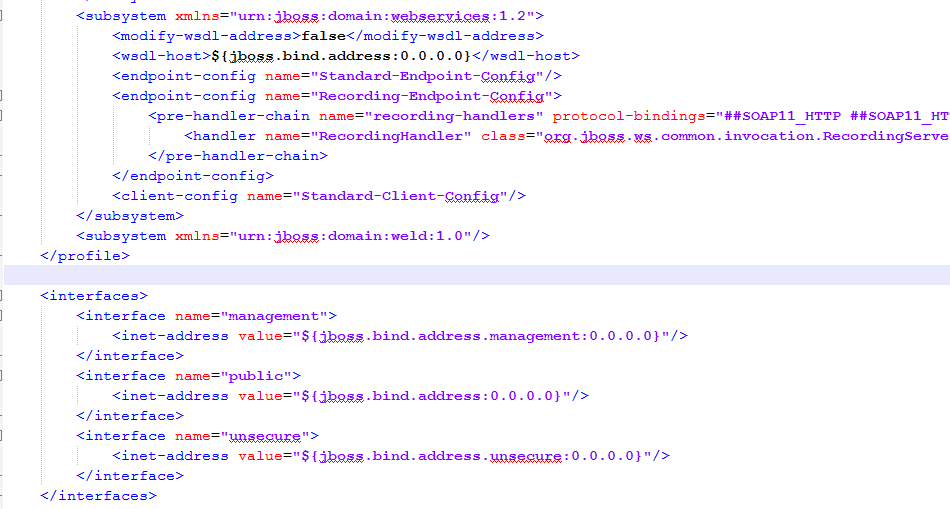
To fix that, we need to make some changes in the "jboss-eap-6.2/standalone/configuration/standalone.xml" where I change the IP addresses from 127.0.0.1 to 0.0.0.0. Like this, JBoss will accept remote call to the Console and to the Web Services.

If your Server is locally, there is no need for this Step and go directly to /jboss-eap-6.2/standalone/configuration/Standalone.xml.

ELSE  :
In order to make it easy to edit remote files, configure FileZilla to edit your files using your favorite program. So in FileZilla go to Edit->Settings and choose you program.


Then:
Come back to Standalone.xml, it should look like this:

So all the addresses are 0.0.0.0.

Now you will be able to access remotely to your Console and to your WSDLs.


Sunday, September 21, 2014

How to Fix Maven compile Cannot find symbol

I was compiling a project using Maven  when I got this error:


Compilation failure: Compilation failure:
[ERROR] /C:/test/unittest/TestManager.java:[3,24] package org.junit does not exist
[ERROR] /C:/test//unittest/TestManager.java:[3,1] static import only from classes and interfaces
[ERROR] /C:/test/unittest/TestManager.java:[138,10] cannot find symbol
[ERROR] symbol:   class Test
[ERROR] location: class org.test.unittest.TestManager
[ERROR]  /C:/test/unittest/TestManager.java:[19,17] cannot find symbol
[ERROR] symbol:   method assertFalse(boolean)

My Junit package was thete as I don't have errors in my code. But NO, I wasn't adding it as a Dependency in the pom but as a jar in my Build Path.

So in order to fix the problem, I have removed JUnit form the Build Path and added it as Dependency:


<dependency>
    <groupId>junit</groupId>
    <artifactId>junit-dep</artifactId>
    <version>4.11</version>
</dependency>


That is it ;)

Log4j 2 Migration Tutorial : Solve ERROR StatusLogger Could not search jar file 'C:\EAP-6.2.0\jboss-eap-6.2\standalone\deployments\myPorject.war\WEB-INF\lib\log4j-core-2.0.2.jar\org\apache\logging\log4j\core

I was working with Log4j-1.2, but have decided to move to Log4j-2.0. I have hence removed the old dependencies and add the new ones.


<dependency>
 <groupId>org.apache.logging.log4j</groupId>
 <artifactId>log4j-core</artifactId>
 <version>2.0.2</version>
</dependency>
<dependency>
  <groupId>org.apache.logging.log4j</groupId>
  <artifactId>log4j-slf4j-impl</artifactId>
  <version>2.0.2</version>
</dependency>

Once done, I deployed my application but got this error:

ERROR StatusLogger No log4j2 configuration file found. Using default configuration: logging only errors to the console.

 ERROR StatusLogger Could not search jar file 'C:\EAP-6.2.0\jboss-eap-6.2\standalone\deployments\myProject.war\WEB-INF\lib\log4j-core-2.0.2.jar\org\apache\logging\log4j\core' for classes matching criteria: annotated with @Plugin file not found java.io.FileNotFoundException: C:\EAP-6.2.0\jboss-eap-6.2\standalone\deployments\drl_m2m.war\WEB-INF\lib\log4j-core-2.0.2.jar\org\apache\logging\log4j\core (The system cannot find the path specified)


In fact, using Log4j 2.0, we need to make some changes on the Log4j file :

- Step 1 : Rename it to log4j2.xml. Change also the file structure.


<?xml version="1.0" encoding="UTF-8"?>
<Configuration status="DEBUG">
  <Appenders>
    <Console name="Console" target="SYSTEM_OUT">
      <PatternLayout pattern="%d{HH:mm:ss.SSS} [%t] %-5level %logger{36} - %msg%n"/>
    </Console>
  </Appenders>
  <Loggers>
    <Logger name="com.myproject" level="trace">
      <AppenderRef ref="Console"/>
    </Logger>
    <Root level="error">
      <AppenderRef ref="Console"/>
    </Root>
  </Loggers>
</Configuration>


- Step 2 : Change the dependencies to use the 2.0 and no more 1.2 libraries.

- Step 3Remove all the log4j filters and listeners from the web.xml According to this JIRA.

- Step 4: Exclude any dependency to old versions of log4j.


<dependency>
 <groupId>common_m2m</groupId>
 <artifactId>common_m2m</artifactId>
 <version>${project.version}</version>
 <exclusions>
  <exclusion>
   <artifactId>log4j</artifactId>
   <groupId>log4j</groupId>
  </exclusion>
 </exclusions>
</dependency>

- Step 5: Change the call in the java code.


import org.apache.logging.log4j.Logger;
import org.apache.logging.log4j.LogManager;

public class MyClass {

 private Logger logger = LogManager.getLogger(MyClass.class);

}

That's all for this post, hope you enjoyed it and thanks for my friend Hassen Kalaldeh for his help.

Articles les plus consultés