Showing posts with label Database. Show all posts

Saturday, March 22, 2014

Jpa Hibernate insert Query: Error in named query: insertQuery: org.hibernate.hql.internal.ast.QuerySyntaxException: unexpected token: VALUES

In order to insert a record into the database, I was wondering to use SQL insert in order to entityManager.persist, as I would like to provide directly the foreign keys.
So I was using a Named Query.
@NamedQuery(name="insertQuery",
query="INSERT INTO person (person_id, name) VALUES (:person_id, :name)")

But at compilation time , I got this error:

 Error in named query: insertQuery: org.hibernate.hql.internal.ast.QuerySyntaxException: unexpected token: VALUES 

In fact, the solution is to use a Native Query.

So I needed to change the @NamedQuery into @NamedNativeQuery. 

As I should setParameters, I should use the createNamedParameter. Otherwise, I will have the error :
 could not locate named parameter.
So my query should look like this.

Query query = entityManager.createNamedQuery("insertQuery")
query.setParameter("person_id", person.getId()); 

Wednesday, March 19, 2014

Hibernate JPA Change the implicit INNER JOIN with a LEFT JOIN with Criteria Builder and build a new Result bean: Only one LEFT JOIN Query is generated

Here my experience with the Generated Queries using my lovely Hibernate. I was stuck for about four days with one of the generated query, but finally I find the solution.


I was developing a code in order to get Persons from my tables using JPA (Hibernate implementation) and Criteria Builder . Performing the test, I have noticed that Hibernates returns only Persons which have a Phone number (as I have a foreign Key on a Contact table). Hibernate do by default an INNER JOIN, and not a LEFT JOIN.

SO to force Hibernate doing a LEFT JOIN with the criteria Builder (I was creating a dynamic query), I used this code:

Root root = query.from(Person.class);

Join phone = root.join("contact", JoinType.LEFT);
...
query.select(builder.construct(MyPerson.class, 
               root.get("contact").get("phone")

The generated Query where :

SELECT phone2.number, person1.name
FROM person person1
LEFT OUTER JOIN phones phone1 ON person1.contact_id = phone1.id
,phones phone2
WHERE 
person1.contact_id = phone2.id

So Hibernate IGNORES in fact my Left JOIN even if it put it in the query. It use the Phone2 and not Phone1 present in the Left Join.  So the rows with contact null, is not yet returned.

If I build my bean by giving the root only, it will generate many other requests.
query.select(builder.construct(MyPerson.class, root);

It was very hard to finally find the solution which consists of removing the Join and do the join while creating the new bean. So the code should be in fact like this:

Root root = query.from(Person.class);
query.select(builder.construct(MyPerson.class, 
   root.join("contact", JoinType.LEFT).get("phone"),...));

So finally the generated query is exactly what I wanted:

SELECT phone1.number, person1.name
FROM person person1
LEFT OUTER JOIN phones phone1 ON person1.contact_id = phone1.id


Postgres Contraint One of the columns NOT NULL

While creating some tables for an application, I have the requirement that in a table at least one of two columns should be NOT Null. This can be checked in the application, but it is better also to do it in the database level in case where we have problems in the application and to make sure that we respect all the time this constraint.

To do so, we can add this constraint in Postgres :


CONSTRAINT chk_onenotnull CHECK (NOT ROW(mobile_phone, home_phone) IS NULL) 

That's all :) .

Tuesday, March 11, 2014

Fix UNIQUE CONSTRAINT with null value

In my database, I have UNIQUE constraint with two columns col_1 and col2.
But, I have detected that while inserting in the database two records with the same value in col_1 and null in col_2, postgres accept it and take null values as different.

So as solution, I have added a default value. My col_2 was a date, so I have inserted a future date '2040-01-01' and in the request, I just do :

select from table where col_2 >= now();

Using JPA, I also disable it to insert a NULL value and let the database putting the default value by using insertable =  flase. Please see this link for more details.

Monday, November 11, 2013

Configure DataSource Setting in JBoss EAP6

In the previous version of JBoss, the configuration of Datasource was quit easy: the datasource file is defined in the JBoss_Home/server/default/deploy/*-ds.xml, while the JDBC driver is just placed in the JBoss_Home/server/default/lib directory.

In the JBoss EAP 6 is quit different and this is done as below.
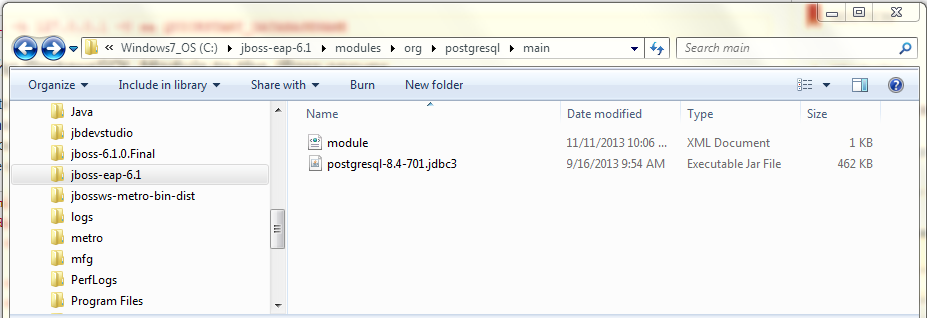
In the Jbosseap6/modules, create the directory hierarchy : org/postgresql/main. Put in the main directory the database jdbc. 
In the same directory, create a file named module.xml and put the following code. Make sure to change the JDBC version according to the used one.


I prefer to manually configure the driver by making changes in the standalone.xml located in "C:\jboss-eap-6.1\standalone\configuration" I add Datasource in the Datasources balise and Driver in Drivers.


In my code I have :
private static final String POSTGRES_DS = "java:jboss/datasources/myPostgresDS";

I run after my server and it's OK ! 

Articles les plus consultés