Monday, April 14, 2014

Spring integration Channel Queue Get the current queue size (queue monitoring)

Using Spring-integration (version 4.0.0.M4), I was using a channel Queue where I Put Mqtt Messages. Multi-threads will take messages from that queue in order to process them.
I needed to know the size of the Queue and to Log it. Warning may be logger if the Queue is reaching some threshold.

So my code look like this:
In the spring-integration.xml  (or applicationcontext.xml), I have declared my channel having a Queue.


No in my Code, I use :

@Qualifier(value="mqttMessages")
@Autowired(required=false)
QueueChannel  queue;

So I get the channel by its Id. So now I can get the Channel Queue Size using :
queue.getQueueSize()

Sunday, April 13, 2014

Spring JdbcTemplate/ NamedJdbcTemplate tutorial : Resolve Date insertion

I was working with Spring JdbcTemplate to insert rows in the data base. My query is:
insert into person (person_id, name, birth_date) values(?, ?, ?)

@Autowired
JdbcTemplate jdbcTemplate;
private String query ="insert into person (person_id, name, birth_date) values(?, ?, ?)"

public void store(Person person){

       jdbcTemplate.update(query , person.getId(), person.getName(), person.getBirthDate());

}

Using this code, I get this error

 org.springframework.jdbc.BadSqlGrammarException: PreparedStatementCallback; bad SQL grammar [insert into
...]
; nested exception is org.postgresql.util.PSQLException: ERROR: column "birth_date" is of type timestamp with time zone but expression is of type character varying

So the database is not accepting the java.util.Date.
Next olution is to use the DATE '2004-02-02' of postgres, so I have modified my query:
insert into person (person_id, name, birth_date) values(?, ?, DATE ?)

So even with this modification I got :
nested exception is org.postgresql.util.PSQLException: ERROR: syntax error at or near "$3"

Ok, so maybe I need to add qotes. My query is now :
insert into person (person_id, name, birth_date) values(?, ?, DATE '?')
This didn't resolve the problem and I got this error:
PSQLException: The column index is out of range: 3, number of columns: 2

Ok, so my last chance is to use NamedParameterJdbcTemplate.
I have modified my code:
1- In the aplicationContext, I added:

<bean id="namedJdbcTemplate" class="org.springframework.jdbc.core.namedparam.NamedParameterJdbcTemplate" >
        <constructor-arg ref="myDataSource" />
</bean>

2- In my code :

@Autowired
protected NamedParameterJdbcTemplate namedJdbcTemplate;

        private String query ="insert into person (person_id, name, birth_date) values(:id, :name, :birthDate)";

public void store(Person person){

       MapSqlParameterSource params = new MapSqlParameterSource();
   params.addValue("id", person.getId());
       params.addValue("name",  person.getName());
       params.addValue("birthDate", person.getBirthDate(), Types.DATE);
       jdbcTemplate.update(query , params);

}

Adding the Types.DATE ( don't forget to import java.sql.Types;), has resolved the problem, and now the insertion is working without any ProBleM ;)


Sunday, April 6, 2014

CSV Tutorial : Convert CSV to Java Bean

In my project I needed to convert a CSV file to a list of beans (Person).
I first used JSEFA, but once tested, I have discovered that this framework have problem to convert fields to Double or Float.

I decided then to move to another framework, and finally I found the CSVeed framework which is quit nice and simple.


By default, the separator in CSVeed is ";" so make sure to change it if necessary.

@CsvFile(comment = '%', quote='\'', escape='\\', separator=',')
public Class Person{
...
}

Their web site have a comparison  with other frameworks which do also the conversion. For more details, have a look on their matrix.

Thursday, April 3, 2014

Spring-integration-mqtt development and resolve MessageDispatchingException Dispatcher has no subscribers

I was using Spring-Integration-Mqtt in order to get messages from the mqtt Broker.


But while testing my application, I got this exception:

 org.springframework.integration.MessageDispatchingException: Dispatcher has no subscribers
at org.springframework.integration.dispatcher.UnicastingDispatcher.doDispatch(UnicastingDispatcher.java:107) [spring-integration-core-4.0.0.M4.jar:]
at org.springframework.integration.dispatcher.UnicastingDispatcher.dispatch(UnicastingDispatcher.java:97) [spring-integration-core-4.0.0.M4.jar:]
at org.springframework.integration.channel.AbstractSubscribableChannel.doSend(AbstractSubscribableChannel.java:77) [spring-integration-core-4.0.0.M4.jar:]
... 10 more

Although the sent messages were received, I got the error. After some investigation, I have found that the problem don't come from spring-mqtt but from my side.
In fact by error, I have declared the service-activator and another bean  with the same Id.

So, If you have this error, make sure that your integration.xml (or applicationContext.xml) is correct.

Now, in order to take benefit from mqtt using Spring, you need to use spring-integration-mqtt and just configure few lines.

The Pom looks like this (if you have problem to locate the remote repository, see this post) :


And the intergration.xml:


Wednesday, April 2, 2014

Setup Maven to access non local repository

I was using Maven in my project, and I needed to add Spring Integration dependency but this latest have its own repository.


But Maven was complaining as it is not considering the given repository and it didn't find the library in the Local repository.
So thanks to a friend (AbdullaF), the solution was to  make some change in the maven setting file.
So just need to go to the local repository (for me it is "C:\.m2"). Then edit the setting.xml.

search for mirrorOf and change it from * to central. Like this Maven will consider the repositories that you specify in the pom.xml.


Tuesday, April 1, 2014

Install and Deploy applications remotely with JBoss eap 6 (JBoss AS7)

This time I will show you how to install, deploy and Test an application remotely on JBoss EAP 6.2, few steps should be done:

Step1: Install JBoss on the remote server.

In order to do that, you need FileZilla and Putty (to execute commands).
So first connect to the remote server using FileZilla. You can put directly your installed JBoss on the remote server or install a new one. Here I will not copy my working one, but I will take the second choice.
So I download the JBoss EAP 6 jar and transfer it to the server.


Then using Putty connect also the server (using an admin account).
Once connected execute these commandes:
java -version
At least you need the version 1.6 of Java.

mvn --version
At leat you need version 3.0

unzip jboss-eap.6.x.x.jar

JBoss will be then installed. So next run it. To do so go to jboss-eap.6.x/bin folder then execute ./standalone.sh. Your server should run without error.

In order to access the console, you need to create a client accout. So using putty and being in the bin folder, execute the command ./addUser.sh.  Then follow the instructions (I used the managementRealm). This account will be used in the console.


Step2: Configure you JBoss.

Now, if you have added some modules to your server like jdbc, or dataSource definition don't forget to add them. So using FileZilla, you can add the new module. For me it was "C:\jboss-eap-6.2\modules\system\layers\base\org\postgresql".
Don't forget also to configure the Standalone.xml with your DataSource and especially give the address where you dataBase is running (my dataBase is running on the same server).

Step3: Configure Remote access to the Console and Web Services.

By default, JBoss can be accessed only locally using the address 127.0.0.1. So I wasn't able to access the console neither the webservices (once the application deployed, coming below).
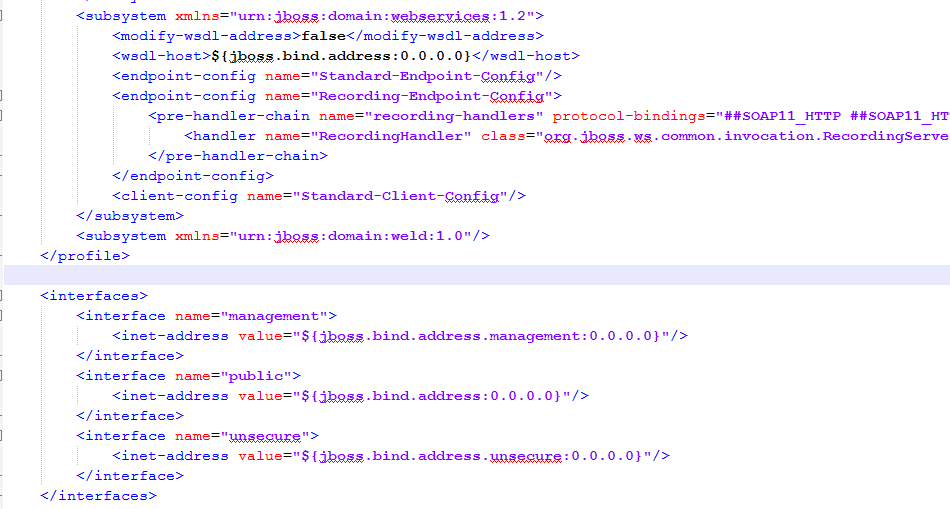
To fix that, we need to make some changes in the "jboss-eap-6.2/standalone/configuration/standalone.xml" where I change the IP addresses from 127.0.0.1 to 0.0.0.0. Like this, JBoss will accept remote call to the Console and to the Web Services.

In order to make it easy to edit remote files, configure FileZilla to edit your files using your favorite program. So in FileZilla go to Edit->Settings and choose you program.


Then:
Come back to Standalone.xml, it should look like this:

So all the addresses are 0.0.0.0.

Step4: Generate the war.


Before deploying the application, you should first generate the war. This cone be done using ant, or using eclipse. So right clic on the project, and Export.


Choose where to save this war locally.

Step5: Deploy the application

It is time to deploy the application. In order to do that (using the console). So use the adress (put your server address instead of "remoteServerAddress"): 
http://remoteServerAddress:9990/console.
Once connected, go to ManageDeployment section. You need to specify your war location. 


Once added, clic on En/Disable in order to enable it and deploy it on the server.


Now you application is ready to be tested.

Step6: Test the application

As my application is a Web service, I need only the address of the WSDL wich I will put in SoapUI. So clic on the deployed war -> webservices and you will have details about the WSDL...
Just create a new project in SoapUI and specify the address of the WSDL.


That's all for today, I hope really that it helped you :)

Articles les plus consultés