Wednesday, February 26, 2014

Resolved Error: Class has two properties of the same name this problem is related to the following location

I have created a bean which I will return in a web service. When deploying on JBoss Eap 6, I have detected this error:

 Class has two properties of the same name  this problem is related to the following location

The source of the problem is that I have both XmlAccessType.FIELD and getters and setters.
The solution is then to create constructors (the default one and with all fields) and remove all the setters. Now it is working.

This is not a good solution !!
So what I have recently discovered thanks to a friend (Ridwan), is that I was putting the attributes of the bean as PUBLIC and having also the getter. In fact, for a bean, the attributes should be PRIVATE (If you don't put the visibility it will be private by default).
The nice Solution is thus to do:

Class Car{

   private String model;
  
   public Car(){
        super();
   }

   public String getModel(){
       return this.model;
   }

   public void setModel(String model){
      this.model =  model;
   }
   
}

Tuesday, February 25, 2014

Resolve Error: javax.persistence.PersistenceException: org.hibernate.exception.SQLGrammarException: could not extract ResultSet

Working in a JPA project, I had this error:

javax.persistence.PersistenceException: org.hibernate.exception.SQLGrammarException: could not extract ResultSet
....
Caused by: org.postgresql.util.PSQLException: ERROR: relation .. does not exist

This error can appear if you are working with two schema in your database. If you are declaring a persistence.xml with only one persistence-unit, there will be an ambiguity as Hibernate will not know the schema on which you are working.
So to resolve this, one possible solution is to add schema name in you entity.

@Entity
@Table(name = "my_table", schema="schema_one")
public class MyTable implements java.io.Serializable

Resolve Error :java.lang.IllegalArgumentException: org.hibernate.hql.ast.QuerySyntaxException: is not mapped

This is a nice error that has take a good time.
By searching this error in the internet, the problem can be about the Entity name given in the query. If you are using HQL, you should specify the Entity name and not the Table name.

But my problem is beyond that. In fact I have two errors:
1- If I specify the table name in an sql query I will have

Internal Exception: org.postgresql.util.PSQLException: ERROR: relation ... does not exist


2- If I specify the Entity name, I will have
java.lang.IllegalArgumentException: org.hibernate.hql.ast.QuerySyntaxException: is not mapped

So I have suspected that my entities are not mapped from the database. In fact even if I open the Hibernate perspective and see my project, I have an error. See this link.
As a solution, I have fixed my persistence.xml, make sure that I can access the tables from the Hibernate console, and thus generate my Entities.

I will sooner post a new article about how to work with JBoss eap6.2 as I have discovered many problems. 

Resolve a org.hibernate.HibernateException: Wrong column type in Error

While generating Entities, some problems can occur.  In fact in some Entities, I had this error:

org.hibernate.HibernateException: Wrong column type Found: int2, expected: int4

In my database, I was using smallint. But when the entities were generated, the attrbute type was set to Integer.

As I need smallint type in my database, the solution was to modify the attribute type to short.

This is sufficient to resolve the problem.

Resolve [Classpath]: Could not create JPA based Configuration and Invalid persistence xml Errors in Eclipse JBoss eap 6.2

The problem is that when I have created the persistence.xml, I was using JPA2.1. JBoss Eap 6.2 comes with JPA2.0, I am also using JBoss Tools. So I have two problems

by: javax.persistence.PersistenceException: Invalid persistence.xml.
Error parsing XML (line-1 : column -1): cvc-elt.1: Cannot find the declaration of element 'persistence'.

and 

[Classpath]: Could not create JPA based Configuration


Solution:  You should not use JPA2.1 but instead use JPA 2.0 as JBoss comes with this latest version. So in the persistence.xml use this declaration.

persistence version="2.0" 
xmlns="http://java.sun.com/xml/ns/persistence"
xmlns:xsi="http://www.w3.org/2001/XMLSchema-instance" 
xsi:schemaLocation="http://java.sun.com/xml/ns/persistence http://java.sun.com/xml/ns/persistence/persistence_2_0.xsd"

Now my persistence.xml is working and I can see my tables in the Hibernate View.


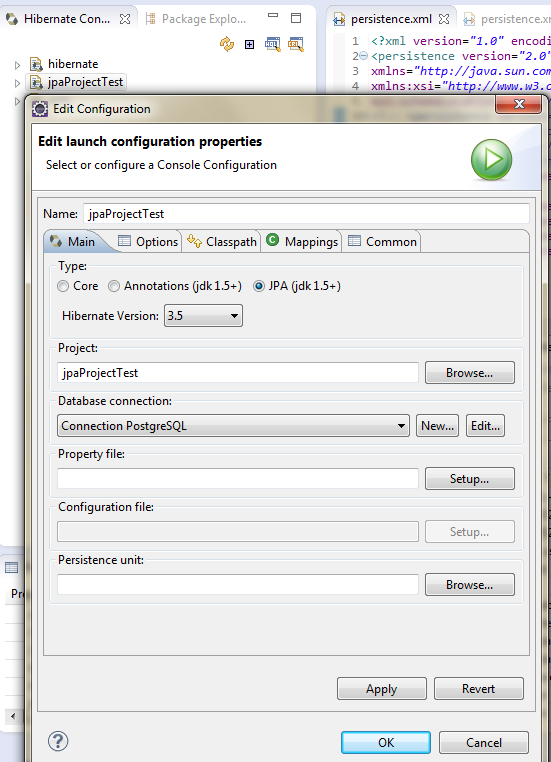
And Here my Hibernate console:

Don't forget to specify the Database connection with the right JDBC. after this, you can see your tables. And thus generate your entities.

Right clic on the project --> JPA tools --> Generate Entities from Tables, and Specify the Hibernate Console.


The entities will be correctly generated.


Monday, February 24, 2014

Resolved Error: org.hibernate.MappingException: Repeated column in mapping for entity

When creating a JPA project, I have created my entities using eclipse and Hibernate tools, See this link.When deploying my application on JBoss server, I had this error:

 org.hibernate.MappingException: Repeated column in mapping for entity: org.qmic.mdd.enterprise.model.MddRelationTableOneTableTwo column: person_id (should be mapped with insert="false" update="false")
at org.hibernate.mapping.PersistentClass.checkColumnDuplication(PersistentClass.java:696)
at org.hibernate.mapping.PersistentClass.checkPropertyColumnDuplication(PersistentClass.java:718)
at org.hibernate.mapping.PersistentClass.checkColumnDuplication(PersistentClass.java:740)
at org.hibernate.mapping.PersistentClass.validate(PersistentClass.java:493)
at org.hibernate.mapping.RootClass.validate(RootClass.java:270)
at org.hibernate.cfg.Configuration.validate(Configuration.java:1324)
at org.hibernate.cfg.Configuration.buildSessionFactory(Configuration.java:1786)
at org.hibernate.ejb.EntityManagerFactoryImpl.(EntityManagerFactoryImpl.java:96)
at org.hibernate.ejb.Ejb3Configuration.buildEntityManagerFactory(Ejb3Configuration.java:914)


In fact, in some association table I use a Composite Primary Key. As the association table should only use these keys, the association with these keys should be set to insert=false and update=false. It is not of the relation class to modify these attributes.

@ManyToOne(fetch=FetchType.LAZY)
@JoinColumn(name="person_id", insertable=false, updatable=false)

So adding these properties, the problem is resolved.


Articles les plus consultés